
12-Amethyst
December 7, 2023
Solved

Problem with bom balloon leaders in drawing

  • December 7, 2023
  • 2 replies
  • 1738 views

Hello!

I have a problem with my drawings. So I have an assembly and a drawing. There are two sheets in the drawing - the first is in A1 format, the second is in A3 format. On the first sheet outside the drawing field there is a specification table and positions are placed based on its repeat region.

The problem is that the ballons break, overlap each other, etc.
For example:

1). Being on the second sheet, I click “update sheets”. After that, I go to the first sheet and see that almost all the ballons have fallen apart. Like that:
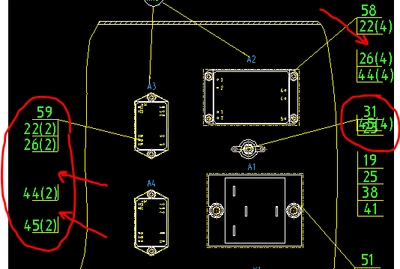
problem_sheet_1.PNG

Ok, then I click “update sheets” on the first sheet and everything falls into place as it should
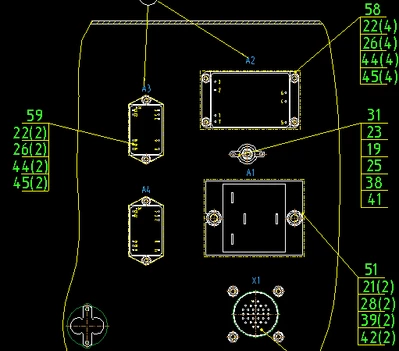
problem_sheet_1_normal_view.PNG

BUT! When I switch to the second sheet, the positions break again, only now on the second sheet.
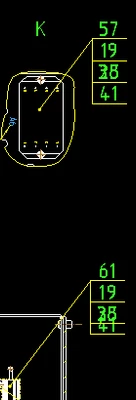
problem_sheet_2_.png

It's a vicious circle...


The interesting thing is that if I make the same format on the sheets, then everything is fine. But I need different formats!
So far the problem is solved by redrawing the drawing, but this is not normal


Creo 5.0.4.0.

Best answer by StephenW

I haven't seen this specific problem but it's possible you have a drawing bug that has been fixed.

There is a article about updating drawing bug https://community.ptc.com/t5/3D-Part-Assembly-Design/Fast-Facts-Quick-Tips-for-Using-PTC-Creo-Drawings-Part-3/td-p/443939


Make sure before you use this to save all your work. Apply the fix per instructions (i suggest the last option under detail options  Update_drawing all ).

Before saving, check your drawing to see if it fixed what was wrong AND check to see if anything else was changed that may not be wanted, then you can decide if you should save or simply Erase memory and re-open.

2 replies

24-Ruby III
December 7, 2023

Hi,

test your drawing in latest version of Creo 5.0. Also test your drawing in latest version of Creo 9.0 and Creo 10.0.

12-Amethyst
December 7, 2023

thanks for the answer, Martin!

StephenW23-Emerald IIIAnswer
23-Emerald III
December 7, 2023

I haven't seen this specific problem but it's possible you have a drawing bug that has been fixed.

There is a article about updating drawing bug https://community.ptc.com/t5/3D-Part-Assembly-Design/Fast-Facts-Quick-Tips-for-Using-PTC-Creo-Drawings-Part-3/td-p/443939


Make sure before you use this to save all your work. Apply the fix per instructions (i suggest the last option under detail options  Update_drawing all ).

Before saving, check your drawing to see if it fixed what was wrong AND check to see if anything else was changed that may not be wanted, then you can decide if you should save or simply Erase memory and re-open.

12-Amethyst
December 7, 2023

@StephenW Thank you, you're incredible!!!