
1-Visitor
November 6, 2019
Solved

Problem with saving as JPEG

  • November 6, 2019
  • 1 reply
  • 13437 views

Hello everyone,


today i discovered a little problem. When i tried to save a part to JPEG file, it apeared that it has purple gradient in the picture even though i have my background set to pure white color. I have also discovered that it only appear when i set my resolution to anything higher that 100 DPI, everything higher what 100 DPI will include the gradient colors in the picture.


Thanks in advance.
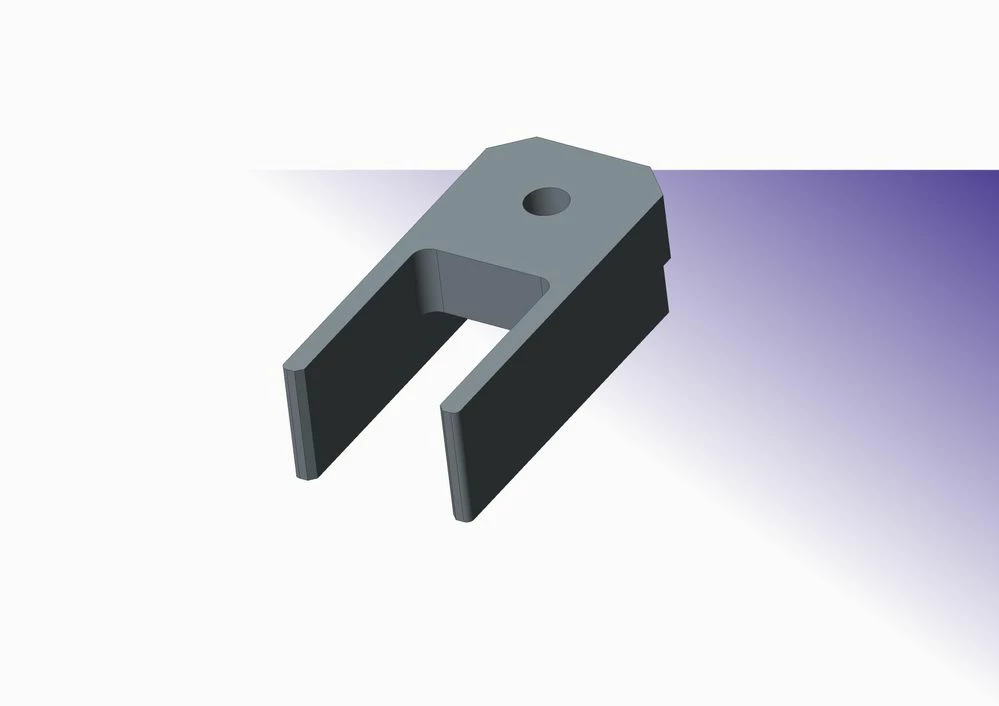
 

vidlicka_doma.jpg

Best answer by MartinHanak

Hi,

try adding following option into config.pro

graphics   win32_gdi


1 reply

23-Emerald III
November 6, 2019

What version and build of Creo?

I did a 600dpi jpeg with white background in Creo4 M080 and it came out fine.


When was the last time you rebooted your workstation?


hhcs_429gr8_generic_white.jpg

llibovič1-VisitorAuthor
1-Visitor
November 6, 2019

Im using Creo 3.0 version M040. Im working on a laptop. i dont understand why is this happening. I have checked all the settings i have nothing set to purple, at least i think. 

23-Emerald III
November 6, 2019

Are you using some sort of render? The purple looks like the top of a "room wall" since it cuts off below the part and there is a "room" that has a purplish hue

17904403-lmrp_drill_thru-dual.jpg