

5-Regular Member
September 14, 2026
Solved

Problem with the connection from .DAT to .PRT with a family table

  • September 14, 2026
  • 8 replies
  • 129 views

Hi everyone,
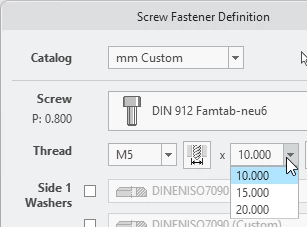
When I try to integrate a custom family table into IFX, I am unable to select a length, only the thread size.
The parameter LG does not seem to be readable. However, I cannot find any errors in the .PRT or .DAT files.
I have attached my original files.

We works with Creo 8.

Perhaps someone can help me?

Thanks in advance.

Best regards,
Peter

Best answer by OliverGräbner

Hi,

I have verified this again.

On my end the fastener could be assembled.
Find attached the modified *.dat and *.prt.

I have added 3 more instances with different lenght.

Which IFX version are you working within Creo 8. I have tested this with Creo 10.
 

8 replies

OliverGräbner
17-Peridot
September 15, 2026

Inside your family table you only have one length for M4 and one length for M5.
So for M4 you only can select the length 8.0mm and for M5 the length 10.0mm

Please add more length for M4 and try again.

Oliver Gräbner - B&W Software GmbH
pschlott5-Regular MemberAuthor
5-Regular Member
September 15, 2026

Hello Oliver,

thank you for your feedback.

But it doesn't work with more than one length, either.

See screenshot ...

OliverGräbner
17-Peridot
September 15, 2026

The problem is this entry:

SUBINFO	MATERIAL

IFX cannot find the column MATERIAL.

You can remove this line or add a column MATERIAL to you family table and to your *.dat file.


Find more details about SUBINFO here:

Did you know about SUBINFO in IFX | B&W Software

Oliver Gräbner - B&W Software GmbH
pschlott5-Regular MemberAuthor
5-Regular Member
September 18, 2026

Hello,

I remove the subinfo with no effect ...

OliverGräbner
17-Peridot
September 18, 2026

Hi,

I have verified this again.

On my end the fastener could be assembled.
Find attached the modified *.dat and *.prt.

I have added 3 more instances with different lenght.

Which IFX version are you working within Creo 8. I have tested this with Creo 10.


Oliver Gräbner - B&W Software GmbH
pschlott5-Regular MemberAuthor
5-Regular Member
September 21, 2026

Hello Oliver,

it looks like my .dat was wrong. I take your .dat and my .prt.

It works.

We work with the IFX 8.0.8.0

But I think it’s a problem, when I find for all of the Diameters I can select all of the lenght, although certain lengths are not available for certain diameters.


OliverGräbner
17-Peridot
September 21, 2026

Hello,

so do you still have problems or is everything fine?
If you have a diameter M4 with 4 length available and you select M5 with no length available it should be possible that the length of the last selected diameters are shown. Normally no length should be available.

For IFX 8.0 we do not have support any longer.

Maybe you problem is already fixed in a newer version.

If required you can attach your problem-fasteners and I can review it.


Oliver Gräbner - B&W Software GmbH
pschlott5-Regular MemberAuthor
5-Regular Member
September 23, 2026

Hello,

thank you for your help.


I think we have to do an update to a newer version. then we think about to use the IFX.


BR

Peter