15-Moonstone
April 12, 2023
Solved

Problem with the solder combiner (#Combine)

  • April 12, 2023
  • 7 replies
  • 2428 views

Hi,

I'm starting to use the welding module.
I have a problem:
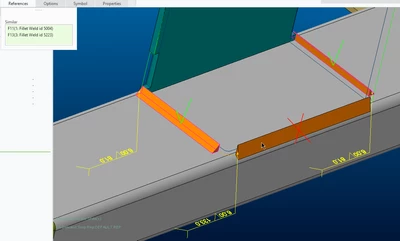
I created three fillet welds, I try to combine them but I can only combine two, selecting the third one this message appears: "The groove/butt weld must be positioned higher in the Model Tree than the fillet weld."

bmancini_0-1681310365625.png

Has this happened to you too?
Have you solved it?

Thank you.

P.S. I'm using Creo 9.0.2.0

Best answer by bmancini

I asked support to the PTC Esupport and they answered me like this:
"I got an answer from our R&D.

The reason combine feature rejects the combination is that value of X_SECTION_AREA is different despite having same legs. The X_SECTION_AREA for solid welds defined as volume / trajectory length which is not well defined for non linear trajectory, which is the case here. We understand that behavior is not ideal but we consider reviewing it in a future release."

The operator, very cordial, then added:
"Alternatively and for this specific case, you can proceed by converting the solid welds to surfaces and manually forcing the value of the « weld cross sec » to an identical value for both welds OR create only one weld feat with 2 sets inside."


For now I consider the answer as a solution, hoping that soon they can better manage the situation.

7 replies

Chris3
21-Topaz I
April 12, 2023

Are they three separate weld features or one?


Have you tried playing with the weld bead size to see if its a problem with that outside radius you have?

bmancini15-MoonstoneAuthor
15-Moonstone
April 12, 2023

That's three separate welds. Three fillet welds with Z6.
By converting the dimensions of the problematic weld from Z to Z1xZ2, the program offers me this dimension, resolved in a curious way.

bmancini_0-1681311995777.png

Even changing the values ​​did not solve the problem.

I also tried to vary the value of the underlying radius but I didn't solve it.

Chris3
21-Topaz I
April 12, 2023

Did you try making the welds as a single feature? You cab pick more than one surface when you are defining your weld so it wraps around the geometry. Sounds to me that this is what you are trying to make them do.

bmancini15-MoonstoneAuthor
15-Moonstone
April 15, 2023

CASE 2:
Another situation similar problem.
Define two simple fillet welds by capping an end joint of both welds.
If a joint of one of the two welds affects the radiused surface, the message "The groove/butt weld must be positioned higher in the Model Tree than the fillet weld." appears. and I can't combine the two welds.

bmancini_0-1681553418656.png

I attach the example files.
I hope someone joins the discussion to express their experience on the matter and perhaps a solution.
Thank you.

bmancini15-MoonstoneAuthorAnswer
15-Moonstone
April 26, 2023

I asked support to the PTC Esupport and they answered me like this:
"I got an answer from our R&D.

The reason combine feature rejects the combination is that value of X_SECTION_AREA is different despite having same legs. The X_SECTION_AREA for solid welds defined as volume / trajectory length which is not well defined for non linear trajectory, which is the case here. We understand that behavior is not ideal but we consider reviewing it in a future release."

The operator, very cordial, then added:
"Alternatively and for this specific case, you can proceed by converting the solid welds to surfaces and manually forcing the value of the « weld cross sec » to an identical value for both welds OR create only one weld feat with 2 sets inside."


For now I consider the answer as a solution, hoping that soon they can better manage the situation.
bmancini15-MoonstoneAuthor
15-Moonstone
April 26, 2023

P.S. They also created a technical article about it: https://www.ptc.com/en/support/article/cs390973