
15-Moonstone
March 3, 2022
Solved

PTC Learning Connector Error

  • March 3, 2022
  • 3 replies
  • 2157 views

Hello everyone,
when i click on this icon bmancini_0-1646305871372.png to open "PTC Learning Connector" i get this error:

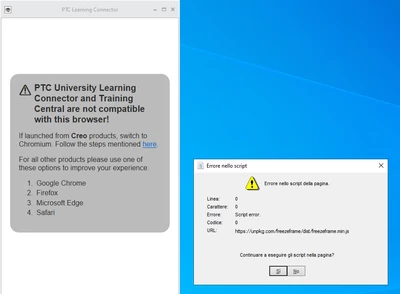
bmancini_1-1646305956461.png

I have made several attempts but without success.
Can you tell me how to solve it?
Thank you
P.S. I am using creo 8.0.0.0


Best answer by VladimirN

 Hi,


Read this article - "Unable to connect to LearningConnector starting from Creo Parametric 7.0.0.0": https://www.ptc.com/en/support/article/cs346017 

3 replies

VladimirN24-Ruby IIIAnswer
24-Ruby III
March 3, 2022

 Hi,


Read this article - "Unable to connect to LearningConnector starting from Creo Parametric 7.0.0.0": https://www.ptc.com/en/support/article/cs346017 

bmancini15-MoonstoneAuthor
15-Moonstone
March 7, 2022

Thanks for your reply, the link in the program still can't make it work.
The only solution is to use the website directly.

bmancini15-MoonstoneAuthor
15-Moonstone
May 19, 2022

It seems that I have answered my problem:
I set:
windows_browser_type chromium_browser
And
js_error_policy suppress_continue

5-Regular Member
July 27, 2023

Learning Connector does not support IE browser, so you need to change your creo browser to chromium one. to do this you have to change this in the configuration 

  • Use config option windows_browser_type chromium_browser to enable Chromium in Creo

About the script error pop, when browsing a page containing JavaScript errors in an embedded browser, a popup is thrown, you can either close the pop-up or suppress it in config so that it will not appear again.

  • Setting "js_error_policy" to "suppress_continue" in config.pro allowed to not get the error