1-Visitor
February 12, 2020
Solved

Purple section of model getting lost on export. How to fix?

  • February 12, 2020
  • 13 replies
  • 5118 views

Hello,


i'm trying to export the model on the left as an stl. However, parts of the model are disappearing. What would cause such behaviour?

Kind regards
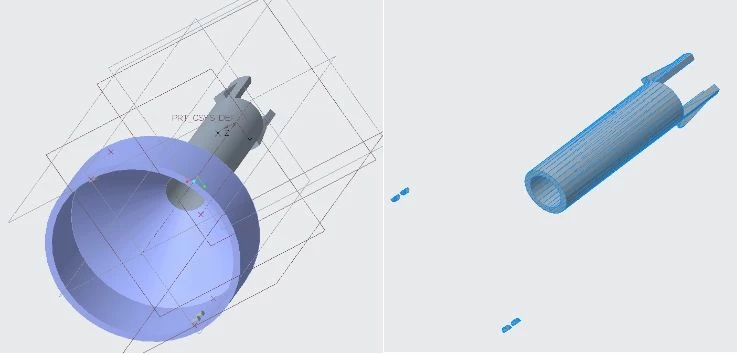
parts missing on export.jpg

Best answer by rreifsnyder

That purple color of the model indicates that it is not a solid but just surfaces. STL can only export solids.

13 replies

15-Moonstone
February 12, 2020

That purple color of the model indicates that it is not a solid but just surfaces. STL can only export solids.

1-Visitor
February 12, 2020

With that response, I used the solidify option on the purple section. Now it's all grey, however it still doesn't export that section. Is there anything else I'm missing?

Kind regards


parts missing on export2.jpg

15-Moonstone
February 12, 2020

Hmm, not sure. Are there any warnings or errors? BTW, what version are you on? There's a good connection between the bell section and the tube right? not like a single edge connecting them or anything? from this angle I can't tell exactly what's going on. Can you post the model?

Mahesh_Sharma
22-Sapphire I
February 13, 2020

@Binders_chill


I tried exporting the file in Creo 6.0.2.0 to STL and it worked for me...  try with default configuration.. 

Dale_Rosema
23-Emerald IV
February 13, 2020

Can Creo 6.0.2.0 open educational files or do you have a "special" version?

1-Visitor
February 13, 2020

Sorry, I don't know what a special version is. I downloaded Creo Parametric 6 student edition from ptc.com, logged in with my university account and then created the above shown model. I know that there is a paid for version, and the files between that one and the educational version are not compatible, however in this case, I create the file myself and try to export it to stl, which has worked before on other models.
