14-Alexandrite
August 15, 2023
Solved

Question regarding blends/lofts

  • August 15, 2023
  • 1 reply
  • 1307 views

Hello,
I am trying to recreate this model from solidworks model mania 2005. (https://blogs.solidworks.com/tech/wp-content/uploads/sites/4/Model-Mania-2005-Phase-1.jpg)

I am having some trouble recreating the lower part that is the blend from the oval section to the circular section without having lines.
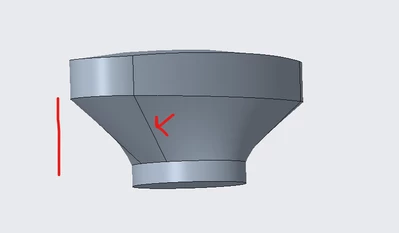
IbrahimTayyab_1-1692101110338.png

As can be seen in the drawing there seems to be no indication of where the circle section should be divided to create the blend (and no such lines appear in the solidwork model), I merely drew a centerline connecting the separation lines for the oval section and used that to divided my circle. 
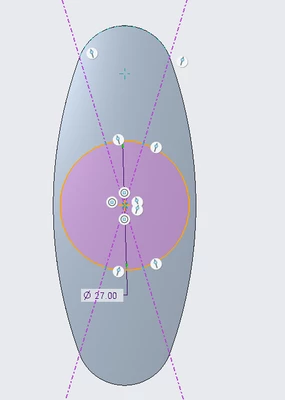
IbrahimTayyab_2-1692101416024.png

Is there an error in my approach or is this a case in which solidworks and creo functionality differs?


Here is a link to their solution video (timestamped) https://www.youtube.com/watch?v=OKgWcBTxD5I&t=8m49s


I am using creo parametric 9.0 student edition.

 

Best answer by kdirth

Because of the way Creo treats circles, always two halves, you will always have lines in Creo creating that shape.  Even cylinders are actually two halves with the line between hidden.

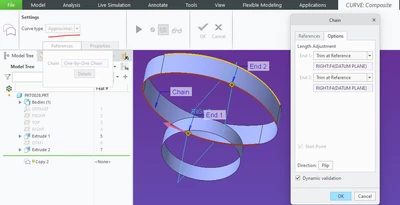
You can reduce the number of lines by creating approximate copies of the oval.

kdirth_1-1692103175069.png

kdirth_2-1692103208714.png


1 reply

kdirth
21-Topaz I
kdirth21-Topaz IAnswer
21-Topaz I
August 15, 2023

Because of the way Creo treats circles, always two halves, you will always have lines in Creo creating that shape.  Even cylinders are actually two halves with the line between hidden.

You can reduce the number of lines by creating approximate copies of the oval.

kdirth_1-1692103175069.png

kdirth_2-1692103208714.png


There is always more to learn.
14-Alexandrite
August 15, 2023

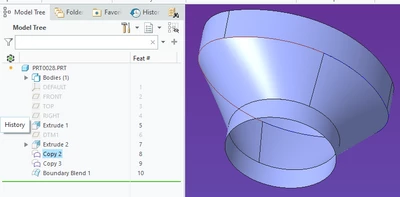
Thanks a lot, I just wanted to make sure I wasn't messing anything up. On another note by creating a copy of both the oval and circle curve and blending them, no visible line is present.

IbrahimTayyab_0-1692112183153.png

Although the surfaces are still separated I was able to achieve the visual I wanted to replicate.

IbrahimTayyab_1-1692112220712.png