15-Moonstone
June 20, 2022
Solved

Re: In sketch is it possible to get windows text fonts as single thickness?

  • June 20, 2022
  • 32 replies
  • 10154 views

A handful of years have gone by since I asked the question on whether it was possible to either generate your own 2D text style font or import this from an outside source.


By any chance has this become easier to do?


My goal is to have a set of text characters that are matched to the text font used with our hand stamps.  The 3D characters do not machine correctly.


I did a lengthy Google search but couldn't find any solution.

Best answer by MartinHanak

@pimm wrote:

Martin:  Thank you, things are getting clearer through your explanations.


There are a couple points I'd like to discuss.


Please explain why Leroy characters are larger than you expect. I do not understand your problem.


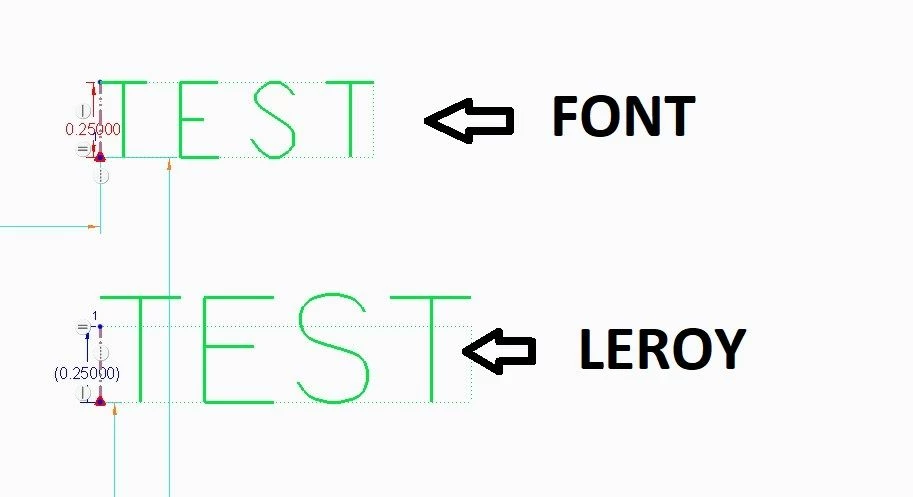
The scale with Leroy is larger than the specified size.  I'll show an example between "font" and "leroy":
FONTS.jpg

Notice how "font" stays true to the text height.  Conversely "leroy" is larger scaled.  What I'd like to find out is whether it is possible to alter a setting to proportionally bring the text to the correct height.  I see that the height in the src header is 63 which is the max.  The width is specified at 36, but also there is an ICS of 1 and fixed width of 1 which likely means the individual widths take over.  Would it be possible to make a universal height change to all text characters?


Another thing that I don't grasp.


The main problem when editing a src file is that PTC does not provide an application that would allow you to draw the shape of the character and then convert it to M and D commands. You have to print a raster on paper and draw the shape of the character in it.


Are you talking about printing off characters and reviewing against needed shapes or printing off a grid to help develop the M and D strokes?


Hi,


Q: Are you talking about printing off characters and reviewing against needed shapes or printing off a grid to help develop the M and D strokes?

A: I mean printing off a grid to help develop the M and D strokes.


Problem: The scale with Leroy is larger than the specified size.

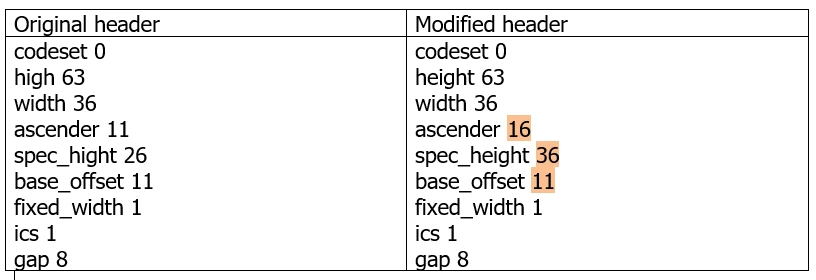
The result of the examination: It is caused by bug in leroy.src.
MartinHanak_0-1655904617985.png


#73
"I"
width 16
m 8,47
d 8,11


Definition of the above character ends at 47.

base_offset + spec_height must be 47 ... therefore I set spec_height to 36

base_offset + spec_height + ascender must be 63 ... therefore I set ascender to 16


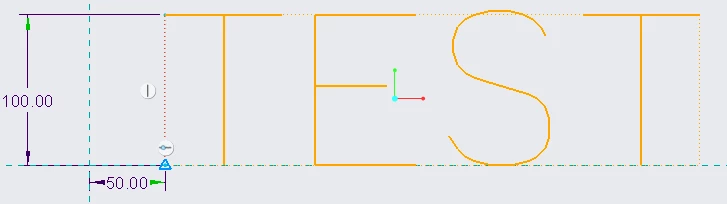
I compiled modified font and created new Sketch feature in new part and result is OK.]
MartinHanak_1-1655905108799.png

MartinHanak_2-1655905158320.png


32 replies

pimm15-MoonstoneAuthor
15-Moonstone
June 20, 2022

I looked at the Install and Administrator PDF for version 7 (which we are using), it is evident that the structure for generating your own text fonts has not changed.  This leads me down a little different road.


Based on how hard it would be to make an entire set of text by hand I would instead prefer to copy the Leroy text font for a different text font file.  I would like to

1) Change a couple text characters such as the "1" which shows up as "I".

2) Change the scale as I need to multiply the size I want by .8 to get accurate height.

3) Change the spacing.

4) Save this file and use it as my default


I am a little confused as to how the change order would work.  Would I:

1) Copy the .src and .fnt file and rename them, or would there be more files that would need to be copied?

2) Decompile the existing new file using the terminal script

3) Change the .src file

 a) modify text such as the "1" using M and D moves.

 b) modify the text height universally from somewhere?

 c) modify the text spacing universally from somewhere?

4) Compile the new file using a terminal script.


Am I anywhere close with this?  Could someone help fill in what I don't have or have incorrect?


pimm15-MoonstoneAuthor
15-Moonstone
June 21, 2022

In my Google search I did find a thread related to Creo version 5.  In this thread there was I believe a compile terminal text.  In the example given it gave:


set COMPILE_FONT_PMT=36
compile_font.exe   isofont.src   isofont.fnt


I tried this for my own generated text font name which I called "stamprite".  Before doing the script I copied the Leroy .fnt, .src and .ndx files and renamed them to stamprite.


I entered the "set COMPILE_FONT_PMT=36" line 1st and it entered without feedback.

Next I entered "compile_font.exe stamprite.src stamprite.fnt and got back the following message

compile error.JPG

I imagine this isn't good but don't know what it means in terms of communicating a change through.

I haven't really made any changes (as my intention will be) as of yet.

Creo did at least read in the stamprite font type.


I don't know how to make the intended changes to the src and have it carry through.


24-Ruby III
June 21, 2022

@pimm wrote:

In my Google search I did find a thread related to Creo version 5.  In this thread there was I believe a compile terminal text.  In the example given it gave:


set COMPILE_FONT_PMT=36
compile_font.exe   isofont.src   isofont.fnt


I tried this for my own generated text font name which I called "stamprite".  Before doing the script I copied the Leroy .fnt, .src and .ndx files and renamed them to stamprite.


I entered the "set COMPILE_FONT_PMT=36" line 1st and it entered without feedback.

Next I entered "compile_font.exe stamprite.src stamprite.fnt and got back the following message

compile error.JPG

I imagine this isn't good but don't know what it means in terms of communicating a change through.

I haven't really made any changes (as my intention will be) as of yet.

Creo did at least read in the stamprite font type.


I don't know how to make the intended changes to the src and have it carry through.


Hi,

suppose that stamprite.src is located in C:\Users\Public\Documents directory.

You have to:

  • open Command prompt window and run following commands (modify last command according your Creo installation)
  • cd /D C:\Users\Public\Documents
  • set COMPILE_FONT_PMT=36
  • E:\PTC\Creo7_050\Creo 7.0.5.0\Common Files\x86e_win64\obj\compile_font.exe stamprite.src stamprite.fnt


tbraxton
22-Sapphire II
June 21, 2022

Current versions of Creo support true type fonts. You can add a TTF font to the Creo font directory and then use it within Creo for sketches to create text or characters. I have used this in Creo 4+ and it works well.


I do not create the fonts, they come from the design/graphics team but they use the Adobe CS products to create the fonts. Once you load the custom fonts in the directory you should be good to go. I will warn you that the font information is not saved with the part so if someone modifies a feature using the font and they do not have the font installed on their machine it will not regenerate correctly.


pimm15-MoonstoneAuthor
15-Moonstone
June 21, 2022

Tbraxton:  Can you use single line thickness fonts as TTF?


We are looking to use one of the few single line fonts for our default.


Leroy is not perfect but it has the most curvature.

tbraxton
22-Sapphire II
June 22, 2022

I would think so but I have not tested that myself. The custom fonts I use are much more complex geometry and stylized. The only thing I use the Leroy font for is a pattern master for CNC engraving on some parts.


There are many free TTF fonts available you may find some worth testing for your application.

Check out the "thin" fonts at this site as an example :

https://ttfonts.net/