1-Visitor
Sep 14, 2022 6:43 PM UTC
Solved

Re: Make assembly component transparent

As per the original post. 


Hello Jose_Costa,

Quick question.  Is the Video Link: 4874 still available?


Thank you,

Mike

kdirth
kdirthAnswer
21-Topaz I
Sep 14, 2022 8:54 PM UTC

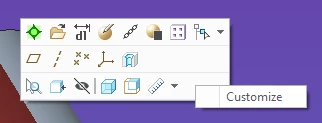
RMB on tool bar and select Customize:  

kdirth_0-1663188814194.png

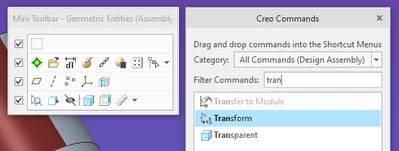
Search for Transparent and drag to toolbar:  

kdirth_1-1663188887668.png


There is always more to learn.

6 replies

StephenW
23-Emerald III
Sep 14, 2022 6:56 PM UTC

I'm not sure what the video was, that was several community migrations back. 

If you are asking about adding a mapkey to the tool bar, you can go to file options and add them to a quick access toolbar.

StephenW_0-1663181745846.png


Translate
1-Visitor
Sep 14, 2022 8:17 PM UTC

Hi StephenW,

Thank you for getting back to me!

From the description, the video may have showed how to make a mapkey for making parts transparent.  


However, I just found out that Creo 4 has the "built-in" transparent option that I was looking for.


Thank you,

MS

Translate
kdirth
21-Topaz I
Sep 14, 2022 8:21 PM UTC

I have a map key I created a few years ago, but now also have transparent and solid added to the quick access tool bar.  If i click on a part the button is right there.

kdirth_0-1663186844858.png


Translate
There is always more to learn.
1-Visitor
Sep 14, 2022 8:28 PM UTC

Hi Kdirth,

If you don't mind me asking, how did you get the Transparent added to your quick access toolbar?  I'm using Creo 4.


So true!  Every day is a learning experience with Creo 😁.


Thank you,

MS


Translate
kdirth
kdirth21-Topaz IAnswer
21-Topaz I
Sep 14, 2022 8:54 PM UTC

RMB on tool bar and select Customize:  

kdirth_0-1663188814194.png

Search for Transparent and drag to toolbar:  

kdirth_1-1663188887668.png


Translate
There is always more to learn.