
12-Amethyst
May 31, 2013
Solved

Remove Common Name column from Familyu Table??

  • May 31, 2013
  • 3 replies
  • 2099 views

This was originally posted a while back, and I wanted to just re-post it to see if anyone has found a way to remove this column from the Family Table. I am working in WF4.0, so this is where I am looking for help on this.

In WF4.0 we are finding that the designated parameter Common_Name is showing up automatically in Family Tables.

Does anyone know if this can be removed from the Family Tables?

Dennis


This thread is inactive and closed by the PTC Community Management Team. If you would like to provide a reply and re-open this thread, please notify the moderator and reference the thread. You may also use "Start a topic" button to ask a new question. Please be sure to include what version of the PTC product you are using so another community member knowledgeable about your version may be able to assist.
Best answer by ClintWalton

Hi Dennis,

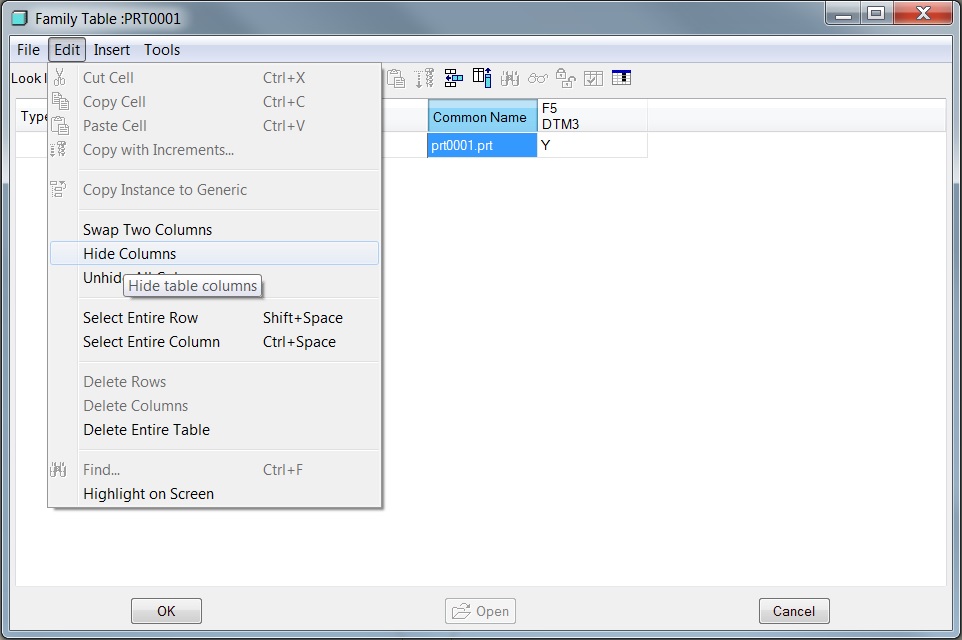
Are you looking to hide the column from the Family Table dialog box? If so, select the column and then click Edit > Hide Columns.

Hide_Column.jpg

3 replies

Patriot_1776
22-Sapphire II
May 31, 2013

I do not believe it can be removed. It's worthess, and I've tried.

1-Visitor
May 31, 2013

Dennis,

In WF4.0 (depends on which build) you can add a filter on the drawing to remove a single or many columns.

In the drawing mode pick Add, filter, by rule, (type in command) &fam.inst.param.name !=(dimension symbol)

don't type in ( ) or [ ] in the command line. then pick done.

Ken

12-Amethyst
June 1, 2013

I am mainly just looking to remove from the family table, but thanks for the replies.

Dennis

1-Visitor
July 30, 2013

Hi Dennis,

Are you looking to hide the column from the Family Table dialog box? If so, select the column and then click Edit > Hide Columns.

Hide_Column.jpg

Patriot_1776
22-Sapphire II
July 30, 2013

True, it can be hidden, just not deleted if I remember.