1-Visitor
December 9, 2023
Solved

Removing material works but won't remove
  • December 9, 2023
  • 1 reply
  • 2814 views

pxtryklew_0-1702126239069.pngpxtryklew_1-1702126270699.png

Hi.

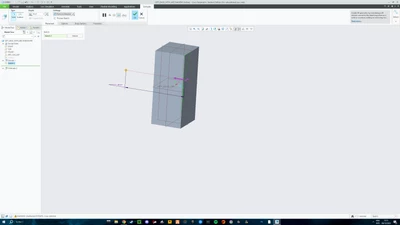
I am using Creo Panametric 8.0. I am new to this programme, but for whatever reason I can't figure out why my removing material when extruding doesn't work. I have looked at other forums but nothing seemed to work. This includes changing the type from solid to surface, as well as making the extrusion into different shapes: some shapes seem to work, some do not.

I have made an extrusion out of ellipse and line tool and want to cut that extrusion out of my current cuboid.

I have the "remove material" selected and it goes through the cuboid but it doesn't remove any material.

Thanks

Best answer by tbraxton

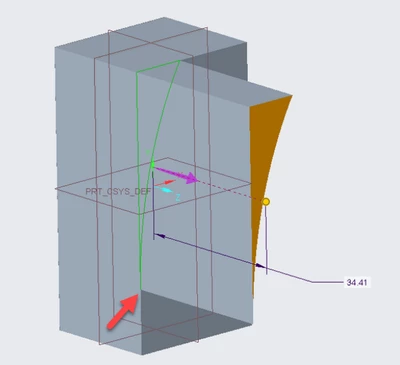
Look at the message area below the graphics window; there is a warning that the extrusion is unattached. Your sketch appears to have zero thickness which obviously would not generate solid geometry.


It is probably due to the taper to zero at the bottom of your sketch. Change the shape of the section and it should then work. If you need that exact shape, then explain in detail the design intent of your model geometry or post the model here.


tbraxton_0-1702127857574.png


1 reply

tbraxton
22-Sapphire II
tbraxton22-Sapphire IIAnswer
22-Sapphire II
December 9, 2023

Look at the message area below the graphics window; there is a warning that the extrusion is unattached. Your sketch appears to have zero thickness which obviously would not generate solid geometry.


It is probably due to the taper to zero at the bottom of your sketch. Change the shape of the section and it should then work. If you need that exact shape, then explain in detail the design intent of your model geometry or post the model here.


tbraxton_0-1702127857574.png


1-Visitor
December 9, 2023
Thank you so much! That makes a lot of sense. All works fine now.