
4-Participant
March 12, 2025
Solved

Rename dimension within datum graph

  • March 12, 2025
  • 1 reply
  • 528 views

I am using Creo Parametric 11.0.2.0 and I am unable to rename a dimension inside a datum graph. I want to use the dimensions inside the graph with a family table, and it is easier to navigate the family table if the dimension is named. The current solution is adding a 'comment row' to the family table and labelling below the actual dimension. But the comment row does not move with the family table when new columns are inserted before (to the left of) the dimension in question.

Best answer by pausob

This is my work-around:

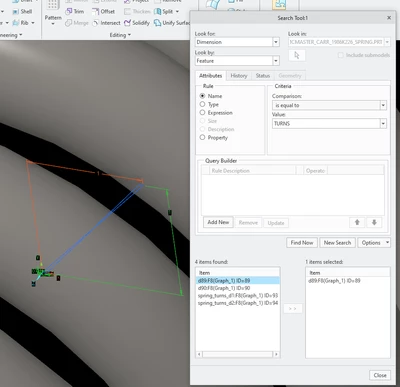
1) use search tool to select the dimension in the graph feature:

pausob_1-1741804867177.png


(in the above example, I had a graph feature named "TURNS")

Once you transfer the dimension to the item selected area (d89 in above screenshot), and you close the search tool, the system will have it selected and you can rename it in the ribbon area:

pausob_2-1741804916804.png


1 reply

pausob19-TanzaniteAnswer
19-Tanzanite
March 12, 2025

This is my work-around:

1) use search tool to select the dimension in the graph feature:

pausob_1-1741804867177.png


(in the above example, I had a graph feature named "TURNS")

Once you transfer the dimension to the item selected area (d89 in above screenshot), and you close the search tool, the system will have it selected and you can rename it in the ribbon area:

pausob_2-1741804916804.png