1-Visitor
October 10, 2020
Solved

Repeat Region issue !

  • October 10, 2020
  • 5 replies
  • 6956 views

Hi,

I have an problem about the table.

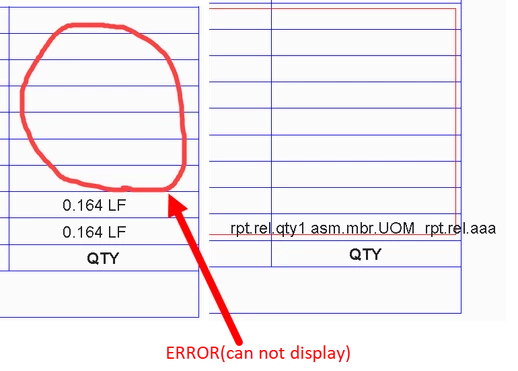
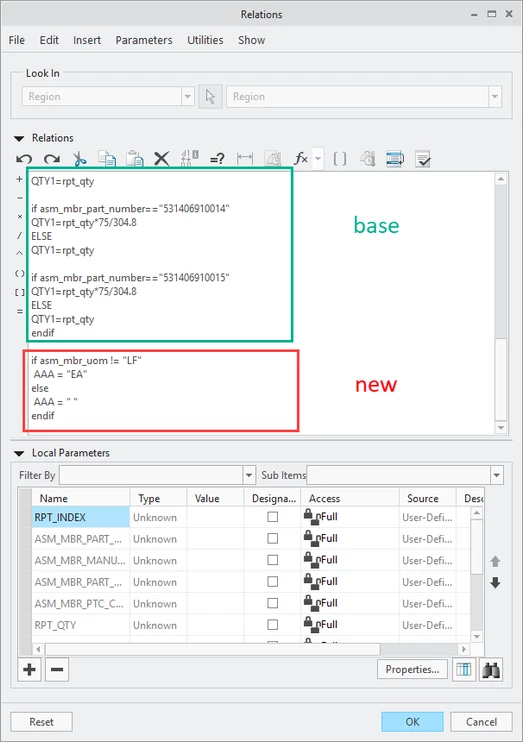
The user defined parameter can not displayed after i add some new code.
1111.png

                                        PIC 1 


222.png

                                               PIC 2

333.png

                                                         PIC 3


When i add the new code in PIC 3. The parameter (QTY1) can't correctly display after update table (see PIC 2)

I don't know what went wrong. There is no problem with the new code.


Best answer by ZC_8293506

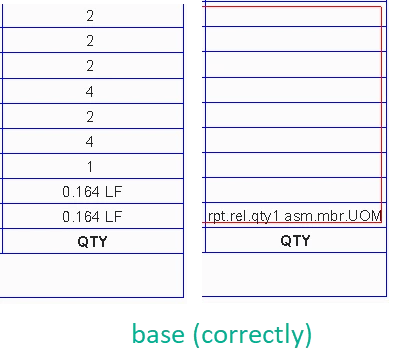
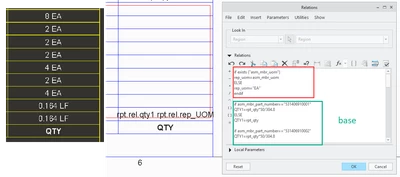
i use an other code instead of the NEW CODE in PIC3 which solved the problem of user defined parameter (QTY1 ) display. 


1.png

5 replies

23-Emerald III
October 10, 2020

Can you upload a sample file and state what version of Creo it was created in?

1-Visitor
October 15, 2020

Please see attached for base code. I used another form of code to solve the problem. 

1-Visitor
October 15, 2020

CREO 4.0

24-Ruby III
October 11, 2020

@ZC_8293506 wrote:

Hi,

I have an problem about the table.

The user defined parameter can not displayed after i add some new code.

1111.png

                                        PIC 1 


222.png

                                               PIC 2

333.png

                                                         PIC 3


When i add the new code in PIC 3. The parameter (QTY1) can't correctly display after update table (see PIC 2)

I don't know what went wrong. There is no problem with the new code.


Hi,

look at base code ... endif command is missing at the end of first if command.

1-Visitor
October 15, 2020

Sorry,  i deleted the ENDIF in PIC 3 by accident  which made the code looks have some bug. But the lack of ENDIF does not exist in the base code. 

Please see attached for base code. I used another form of code to solve the problem. 

23-Emerald IV
October 12, 2020

Looks like you're missing an 'ENDIF'.

1-Visitor
October 15, 2020

Sorry,  i deleted the ENDIF in PIC 3 by accident which made the code looks have some bugs. But the lack of ENDIF does not exist in the base code. 

22-Sapphire I
October 12, 2020

@ZC_8293506


Relation as in image may help.... 


MaheshSh_0-1602506754515.png


EDIT: If this doesn't work, share a sample file and replace the report parameter asm_mbr_name with asm_mbr_part_number or as per your use case with appropriate values. 


1-Visitor
October 15, 2020

Thank you for your new idea !

But it look like another user defined parameter "AAA" can't display correctly. Creo4.0 is strange😂

6666.png 

The error also exist in your screenshot

9999.png

ZC_82935061-VisitorAuthorAnswer
1-Visitor
October 15, 2020

i use an other code instead of the NEW CODE in PIC3 which solved the problem of user defined parameter (QTY1 ) display. 


1.png

1-Visitor
October 15, 2020

Of course . I don't know what's wrong with the code (in PIC3) I added before. But they do cause the display error. ðŸ˜°