1-Visitor
July 27, 2016
Solved

Repeat regions

  • July 27, 2016
  • 5 replies
  • 7253 views

Hi,

I'm running Creo 3.0 M050, and have a problem where I'm trying to create a BOM in my detail drawing of an assembly. The table is placed in the drawing and a region appears to be set, as the table shows the correct number of rows for each part in the assembly and I can apply balloons to the views. However, the table is not populating data in the columns, even for "rpt.index". What may be the cause and fix for this? Also, I have created a hole table for one of the components in this drawing, could I have fouled something then trying to do this?

Thanks in advance.

Best answer by StephenW

Does your drawing have more than one model? If so, maybe you had the wrong model active when you added the bom table.

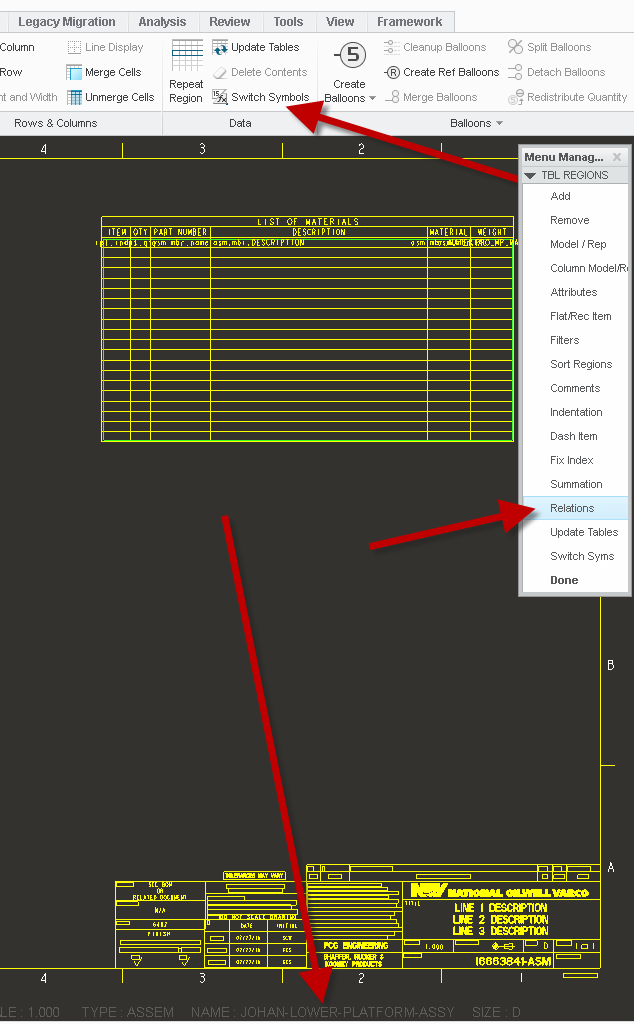
Just verify you haven't hit the switch symbols icon in the ribbon.

Table relations are in the menu manager when you pick the repeat region icon in the ribbon.

5 replies

1-Visitor
July 27, 2016

Sounds like it's missing one of the parameters used in the parameter list.

Click on Table tab -> Repeat Region -> then in Menu manager (i guess that persists in Creo 3.0 but not sure) choose Relations. In the newly opened Relations window you will find a down arrow that shows the parameter list. If any parameter that is used in the table is missing there then the Repeat Region won't work correctly.

meline1-VisitorAuthor
1-Visitor
July 27, 2016

It does appear to have all the proper parameters...

Relations_2016-07-27_11-19-37.tiff

Chris3
21-Topaz I
July 27, 2016

Your relations picture didn't come through. Are your relations causing a violation anywhere? For instance:

extract(asm_mbr_name,1,3) == "ABC"

If your part was called "AB" the function would try and extract a 3rd character from a 2 character string. When this happens, the repeat region just returns a blank value. Do you have any cases like that?

meline1-VisitorAuthor
1-Visitor
July 27, 2016

Sorry, I'm not even sure how to check for that.

meline1-VisitorAuthor
1-Visitor
July 27, 2016

Okay, so I executed TABLE>DATA>SWITCH SYMBOLS and the table is now populating as I would expect. Must have inadvertently executed that previously that caused my issue in the first place?

Thanks to James62 and Christopher Rees for your efforts.

23-Emerald III
July 27, 2016

I was a few minutes too late with my comment.

StephenW23-Emerald IIIAnswer
23-Emerald III
July 27, 2016

Does your drawing have more than one model? If so, maybe you had the wrong model active when you added the bom table.

Just verify you haven't hit the switch symbols icon in the ribbon.

Table relations are in the menu manager when you pick the repeat region icon in the ribbon.

meline1-VisitorAuthor
1-Visitor
July 27, 2016

Stephen,

Yes, I did have more than one model. Thanks for explaining.

1-Visitor
July 19, 2020

I'm not sure I can follow the solution replied here.

Up for this post, I have the same issue as well, and would love to hear solutions from you guys

kdirth
21-Topaz I
21-Topaz I
July 20, 2020

If you Have the same issue as the original post - complete table, BOM balloons populated, no data shown in table, go to the Table tab, in the Data section is Switch Symbols, select Switch Symbols to show the data.


SwitchSymbols.jpg

There is always more to learn.