
12-Amethyst
November 30, 2023
Solved

Replace view model

  • November 30, 2023
  • 1 reply
  • 1538 views

Hello,


I'm using Creo Parametric 8.

When I try to replace a model of a view the OK button is still greyed out.
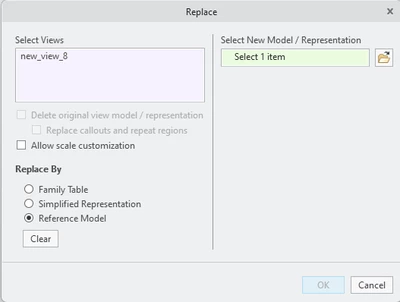
ELDAFRAWY_0-1701331707701.png


I am seeking clarification on whether the "Replace by Reference Model" option is designed for specific cases or if it is intended for use with any model replacement.

 

Best answer by tbraxton

Reference model in this context applies to the use of Merge and Inheritance, shrinkwrap features. Refer to the article below for more information.


Article - CS109945 - How to replace 3D model in drawing in Creo Parametric (ptc.com)

1 reply

tbraxton
22-Sapphire II
tbraxton22-Sapphire IIAnswer
22-Sapphire II
November 30, 2023

Reference model in this context applies to the use of Merge and Inheritance, shrinkwrap features. Refer to the article below for more information.


Article - CS109945 - How to replace 3D model in drawing in Creo Parametric (ptc.com)