Solved
Representing dual dimensions "side by side instead" of "top bottom"
- 1 reply
- 580 views
- Translate All
Hi Dear,
I am having a 2D Drawing which requires to show Dual dimensioning in a table for BOM.
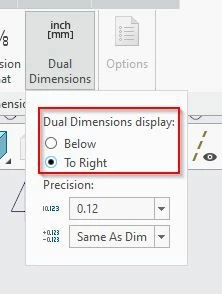
Option 1 (See attached image) :Right now by default in Creo 2D Drawing the dimensions shows up Top[mm] and Bottom[Inch].
Option 2 (see attached Image) : I would like to show dimensions side by side - Calling dimensions from Model. Left [mm] right sixe [Inch]. (I have manually written as of now in this image),
I would appreciate if you can adivse how can I achieve option 2 for dimensions that are called from Model?
Thanks so much in advance.