
10-Marble
January 15, 2025
Question

Resetting sketch line properties in Creo9/ impossible?

  • January 15, 2025
  • 2 replies
  • 728 views

HI all, 
I got a bunch of quite complex sketches, that serve as gasket centerline in the part. 
to better see them in the skeleton model assembly, I changed properties of those sketches to a random, different than default appearance. 
then, as I wanted to go back to their previous style , I've drawn a new sketch and in properties of the sketch copied the style from existing and selected that new entity.

result is far from expected, as now I have a line, that is visible the same in 3d, but in different color inside the sketcher compared to fresh sketch.
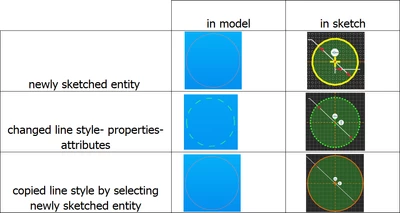
 

MaciejSemeniuk_1-1736929367445.png


Any tips in resetting the line style of entities that were changed to default style without the need to re-draw all of them again  ? 

2 replies

KenFarley
21-Topaz II
January 15, 2025

Regrettably, I don't see any way to get the "default" properties for sketch entities to be restored. Seems that once you've set the color of the entities, they will always show the same color as they have in the sketch. You can't return them to showing one color when you're in sketch mode and another (the default sketch color) when you're in part/assembly mode. There's no "cancel all formatting" or whatever like there is for surface/solid appearances (where the part turns that ugly grey).

Unless someone has a technique I haven't seen.

kdirth
21-Topaz I
21-Topaz I
January 15, 2025

I tried resetting line properties in Creo 7 and CreoPlus (12).  I could not find a way to reset the line properties.  Even using select and selecting an original line did not achieve a reset.


May be a good candidate for an Idea

Maybe it will happen sometime in the future (I will probably retire before then 😀)

There is always more to learn.
19-Tanzanite
January 15, 2025

I'm not sure.  On my system (creo 10) - the custom properties revert if I set them to those of a newly drawn line in the sketch.

- or explicitly assigning them the color "Sketch" and linestyle SOLIDFONT...

kdirth
21-Topaz I
21-Topaz I
January 15, 2025

I think the issue is that the color does not revert to blue (the sketch color in system appearance) when the sketch is finished.  In 7 & 12, when a sketch is finished, the color changes from orange to blue.  Once you apply a color to the line properties it will always be the selected color after finishing the sketch.


The finished color can be updated outside the sketch by selecting the line/line segments and changing the properties.  However, the line color is also changed within the sketch.

There is always more to learn.