1-Visitor
December 10, 2023
Solved

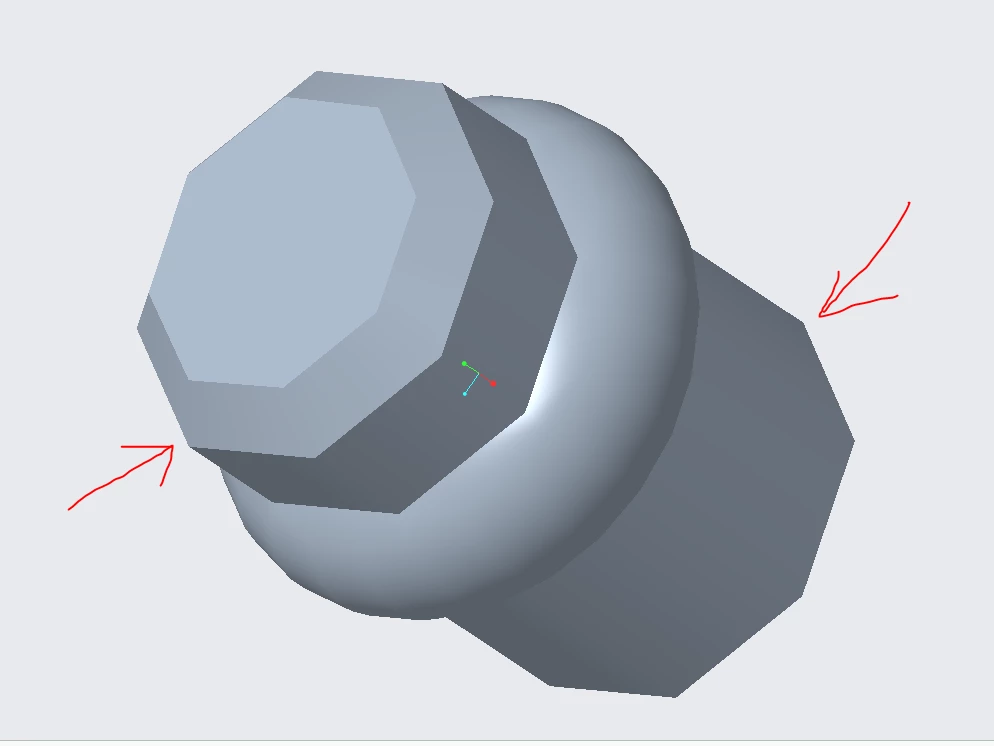
Revolving is not round it is coming hex

  • December 10, 2023
  • 2 replies
  • 1761 views

Hiii Good Morning all,


I have just started to learn Creo, I have installed Creo 10, 

while revolving i am getting issue, instead of round it is coming hex revolving, 

please help me to resolve the issueP1.PNG
Best answer by KenFarley

Perhaps you are experiencing the same as the person in this discussion:

https://community.ptc.com/t5/3D-Part-Assembly-Design/Revolve-result-is-not-smooth/m-p/906754 

2 replies

16-Pearl
December 10, 2023
Check chord height to control curved surface resolution high values make circles look like polygons change it in file > options > model display find chord hieght and lower it. Also facet surface display creo settings affect facetted surfaces low resolution can make curves look like polygons adjust in model display options.

KenFarley21-Topaz IIAnswer
21-Topaz II
December 11, 2023

Perhaps you are experiencing the same as the person in this discussion:

https://community.ptc.com/t5/3D-Part-Assembly-Design/Revolve-result-is-not-smooth/m-p/906754

