
1-Visitor
December 12, 2019
Solved

Righ Click No Dropdown Menu

  • December 12, 2019
  • 2 replies
  • 2424 views

Hey guys,


Just start learning Creo. I now have a problem:

In the instruction, instructor does a lot of right-click, will have a pop-up menu, as shown below.

Mine will not show anything. Is there some setting?
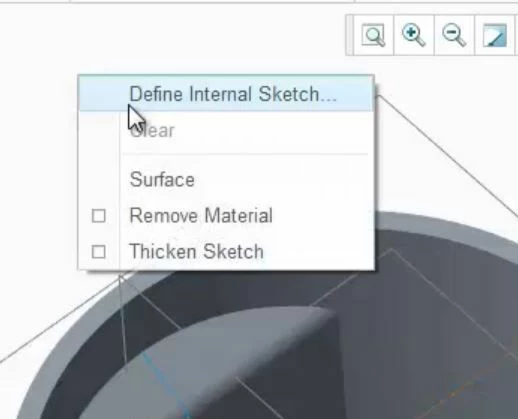
 

Capture 1.JPG

How do I change my software? Or how can I define the angle between two lines? Thanks!

Best answer by JariElomaa

Remember to slam down the right mouse button at least for one second. There is a delay in the right-click menu. It does not come up as quickly as in any other Windows program.

2 replies

23-Emerald III
December 13, 2019

It depends on which tab you have selected and if you have pre-selected any geometry or datums.

RMB is context sensitive so you will get different options based on what you have selected or not selected.

14-Alexandrite
December 13, 2019

Remember to slam down the right mouse button at least for one second. There is a delay in the right-click menu. It does not come up as quickly as in any other Windows program.

1-Visitor
October 24, 2022

So its a right hold more than it is a right click 😵 I wish I knew this a few months ago

kdirth
21-Topaz I
21-Topaz I
October 24, 2022

RMB has two main functions depending on how long you hold it.  A hold (~1/2 sec) will bring up a context sensitive menu, A click will perform a querry selection: cycles the preselection through all of the items available for selection under the pointer.

There is always more to learn.