12-Amethyst
May 24, 2023
Solved

rotate text for angle dimension

  • May 24, 2023
  • 5 replies
  • 2704 views

Hi, 


Is it possible to rotate the text for angle dimenions call out?


please see attached example.

i would like the orientation of the text to be on the same side of the dimension line, rather than opposite as shown 

Best answer by kdirth

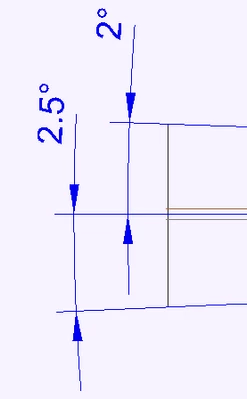
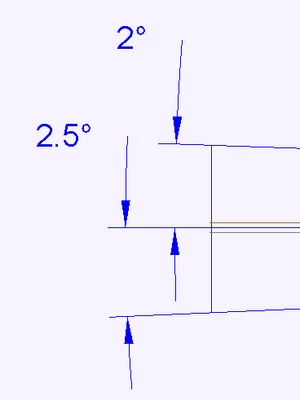
I don't think it is possible to get one of them to flip and read the same as the other.  Creo is trying to keep the text closer to right side up. flipping the lower one would make it closer to upside down.


You could move the lower text up above the horizontal axis to get it to flip.  The other option is to make both oriented horizontal.

kdirth_0-1685018857118.png 

kdirth_1-1685018944684.png


5 replies

kdirth
21-Topaz I
May 24, 2023

The text orientation is controlled by the Display control box.  Parallel Above is what is shown in your image.  Parallel outside may be what you want.

kdirth_0-1684939006765.png


There is always more to learn.
AnthonyC12-AmethystAuthor
12-Amethyst
May 25, 2023

ok then how can i filp the text to read the same as the other text?

AnthonyC_0-1684992867044.png


kdirth
kdirth21-Topaz IAnswer
21-Topaz I
May 25, 2023

I don't think it is possible to get one of them to flip and read the same as the other.  Creo is trying to keep the text closer to right side up. flipping the lower one would make it closer to upside down.


You could move the lower text up above the horizontal axis to get it to flip.  The other option is to make both oriented horizontal.

kdirth_0-1685018857118.png 

kdirth_1-1685018944684.png


There is always more to learn.