
1-Visitor
March 22, 2017
Question

Rotation for part(s)

  • March 22, 2017
  • 4 replies
  • 1603 views

Hello,


There is the "rotation" option under the "translation" but it doesn't operate so easily than the definition of translation. Why? How can I define a simple rotation (with certain angle value) for a body?
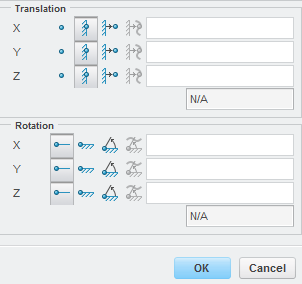
rot.PNG

Mechanica shows the next notice continously:

rot_uzenet_1.PNG

Thanks:

Roland

4 replies

13-Aquamarine
March 22, 2017

Hi Roland,

You can't directly apply rotations to solids, because (as I understand it) constraints actually apply to nodes, and nodes only have three DOFs, not six.  Same thing applies to moments, although there a Total Load At Point will get round the problem.

As the message says, you should be able to do it through a rigid link.  Here's an extreme example:

Enforced displacement, tangential direction, more than 1 revolution

(this also mentions an alternative approach which is to use a cylindrical csys and apply a theta constraint).

rrakos1-VisitorAuthor
1-Visitor
March 22, 2017

Hello Jonathan,

ok, I have wrtitten that the using of rigid link is OK for the rotation. I define the rigid link between a point and a surface but it doesn't operate.

This is my testmodel with cylindrical coord. system:

rlink_01.PNG

It is the point and the surface for the rigid link:

rlink_02.PNG

And the displacement:

rlink_03.PNG

Based on results, the rotation doesn't occur.. What is wrong? The rigid link?

Thanks

Roland

13-Aquamarine
March 22, 2017

A couple of thoughts:

  1. You seem to have tried both solutions at once.  Either try the rigid link with a Cartesian constraint; or a cylindrical theta displacement applied to the outside edge of the end surface (I think the units of theta are mm).  I'm not sure how a point will respond to a theta displacement, given that it has zero radius.
  2. I've had problems with points on the model geometry (they seem to become nodes of solid elements) - try moving the point out into free space.
17-Peridot
April 13, 2017

Hi,

I've used Creo 3 M110 for creating the attached file.

I've no used rigid link related to a point for imposing a rotation.

In my example the goal was the rotation of 2 mm (arc) and I done this in two manners: by imposing the linear rotation and the angular (radiants) rotation.

Bye