14-Alexandrite
September 27, 2023
Solved

Save a note with GTOL symbol

  • September 27, 2023
  • 1 reply
  • 1447 views

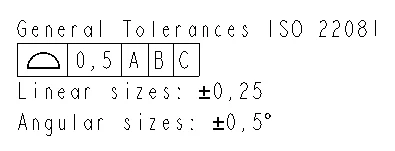
I wish to save this note as a symbol, but cannot get the feature control frame to come through. How can I save this other than an image?

 

ScottJohnson_0-1695825780732.png


Best answer by StephenW

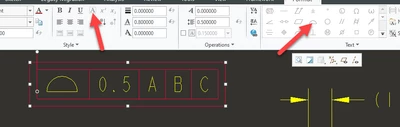
Instead of making the FCF as actual GD&T feature, make it as a note utilizing the box function and symbol pallette within the note creation ribbon.

StephenW_0-1695826421182.png


1 reply

StephenW23-Emerald IIIAnswer
23-Emerald III
September 27, 2023

Instead of making the FCF as actual GD&T feature, make it as a note utilizing the box function and symbol pallette within the note creation ribbon.

StephenW_0-1695826421182.png


14-Alexandrite
September 27, 2023

I can do that, but the boxes will not be there when I place it in another drawing.

kdirth
21-Topaz I
21-Topaz I
September 27, 2023

They should copy just fine.  The box button is just inserting the box defining text into your note ( @[***@] )

If you look at the properties of the text, in the text tab you will see:  @[⌓@]@[0.5@]@[A@]@[B@]@[C@]

kdirth_0-1695832729919.png


There is always more to learn.