
11-Garnet
July 31, 2020
Question

Save as PDF, hidden lines are very short dashed lines, not scaled

  • July 31, 2020
  • 3 replies
  • 6873 views

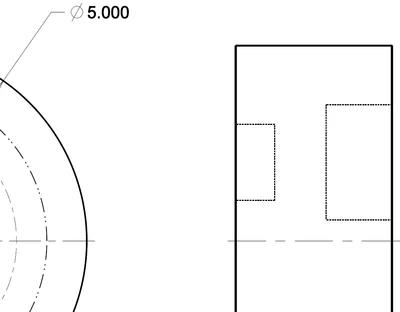
I'm in Creo 7 & Adobe Acrobat X.  I do a Save As/Save a Copy/PDF and the PDF I get has really short dashed lines that are supposed to represent hidden lines, there not scaled to the size of the part.  This wasn't a problem in Creo 6?  Is there a solution?
 

tbuffington_0-1596210251604.png


3 replies

17-Peridot
July 31, 2020

Are you using a PEN File?  That would be my first thing to check...  if not, you should probably define one and play with the settings.


http://support.ptc.com/help/creo/creo_pma/usascii/index.html#page/fundamentals%2Ffundamentals%2Ffund_two_sub%2FTo_Change_Plotting_Pen_Attributes.html%23wwconnect_header


Dave

Mahesh_Sharma
22-Sapphire I
July 31, 2020

@TB_7118605 


Try setting config intf2d_out_pdf_scale_line_fonts as no and export to PDF. I hope this will help.

3-Newcomer
August 25, 2020

I could not find that config at all. I also have a similar issue.  We are going from Creo 4 to Creo 7.  All the configs, pentable, etc....are the exact same.  The PDF export on Creo 4 is different than Creo 7 and I cannot figure out why.  I also did some testing and all the older drawings we use dont have this issue (when I say older these drawing started like 5 years ago).  Any new drawings or even a drawing created back in 2017 has this line style issue when doing an export with Creo 7.  Its a very weird situation.  See attached pictorial.  the phantom line style is normal in Creo 4 and in Creo 7 it much tighter/looks like solid.  Hope someone can help.

rbreyette-2_0-1598379479517.png


kdirth
21-Topaz I
21-Topaz I
May 6, 2021

Look at Article - CS321071 for the resolution.  In a nut shell there is a hidden config setting intf2d_out_pdf_scale_line_fonts that needs to be set to no.  go to File / Options / Configuration Editor and select "Add..." button. enter the config name, set it to no and select Ok.

There is always more to learn.