Dale_Rosema
23-Emerald III
23-Emerald III
August 10, 2022
Solved

Save As PDF - Open file in Acrobat Reader - config option

  • August 10, 2022
  • 1 reply
  • 1825 views

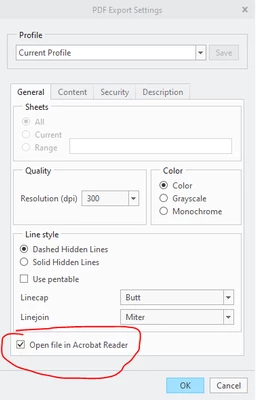
When doing a "Save As" pdf, the read opens unless you uncheck "Open file in Acrobat Reader".

This last for as long as the session does.

Is there a config option to "uncheck" this permanently?

Thanks,

Dale
 

Dale_Rosema_1-1660144890122.png


Best answer by mkajdan

What we have done is saved a PDF export profile that has that box unchecked and created a mapkey to use that profile.  You'll need to set config option intf_profile_dir to the folder the .dop export file is saved to.


There is not a config option to change the default PDF export settings to a modified version.  An idea to do this has already been entered. 464380

1 reply

mkajdan14-AlexandriteAnswer
14-Alexandrite
August 10, 2022

What we have done is saved a PDF export profile that has that box unchecked and created a mapkey to use that profile.  You'll need to set config option intf_profile_dir to the folder the .dop export file is saved to.


There is not a config option to change the default PDF export settings to a modified version.  An idea to do this has already been entered. 464380

Dale_Rosema
23-Emerald III
23-Emerald III
August 15, 2022

I have created a PDF Profile. Now I am trying to set it with a mapkey.

How do I call it without creating a .pdf?

I would like this to be a stand alone mapkey that is run after starting up Creo.

Dale_Rosema
23-Emerald III
23-Emerald III
August 15, 2022

I also checked the "Stroke All Fonts" on the "Content" Tab.


Dale_Rosema_1-1660571439900.png