Hello @V.Cebrián_RO
Just for information, please consider first that, from a terminology perspective, the kind of User Interface (Measure: Summary) you show in your snapshot is what we call an Auxiliary Window and not a Popup (see snapshot below for a better understanding). Sharing info with you to introduce what follows next, but also to help you using the good terminology if you would like to pursue your investigation and use the good keywords while searching in our Knoweldge Base or Help Center locations later on.
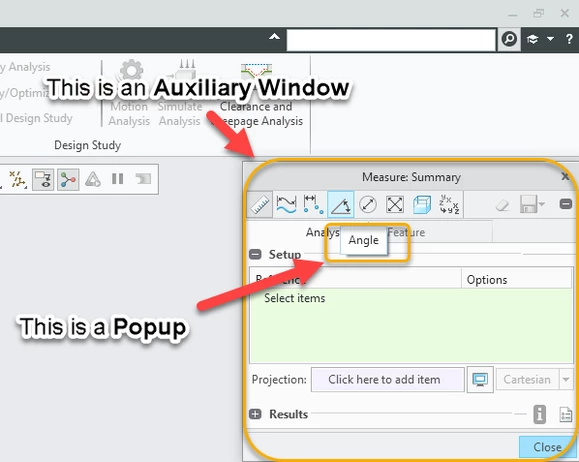
Related to that, it's unfortunately currently not possible to set a custom default location and size of an Auxiliary Window in Creo Parametric. You can do it after having launched the command, but if the Auxiliary Windows is closed and reopened (even in an ongoing session), it will automatically always come up with default location and size. We officially document this current limitation in our article 216509.
Outside from standard, and investigating this in the direction of developments, using Toolkit or JLink capabilities as introduced to you by @tbraxton (Thanks a lot for this!!), consider that usually, those kind of developments are oriented to:
- Create New custom User Interaces - akas UIs (with custom actions called in it, but always starting from what is possible to do with standard Creo Parametric Capabilities)
- Eventually call existing standard UIs (as part of eventual other actions called in the development)
- BUT NOT to MODIFY standard UIs
Due to point 3 above, I suspect that even usage of development won't be really helpful in the direction you're looking for. Just consider this last part of my explanation with caution, as I'm not an expert in TOolkit development, so that I may have missed something in this direction.
Remains therefore the possibility to approach this with a mapkey. Refer to movie at the end of this post for a better understanding of what I mean.
Regards,
Serge

