


StephenW
23-Emerald III
August 22, 2026
Question

Second axis pattern dimension

  • August 22, 2026
  • 3 replies
  • 92 views

I use creo 10 but I also tested on Creo+ (13).

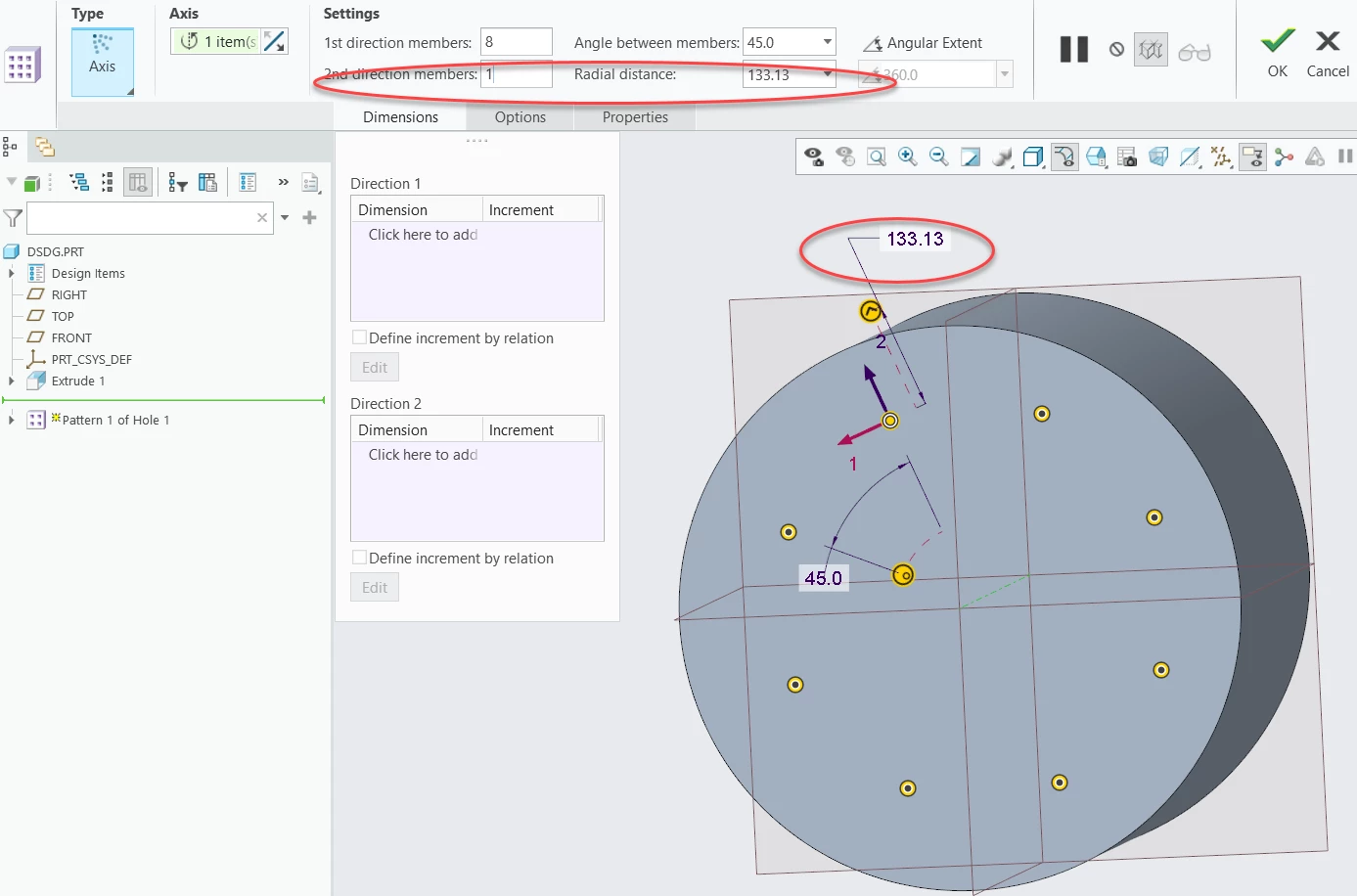
I asked recently, “Why does axis pattern show 2 “direction” dimensions when I only have one direction?” I had noticed this but never really asked. I don’t remember it doing this in creo 6 or 4 and before, not sure which


3 replies

tbraxton
22-Sapphire II
August 22, 2026

The pattern tool was updated for Creo 10. 

Dimension Pattern—More Flexibility for Pattern of Pattern

This functionality was added by PTC in part based on my request for the ability to create a variable axial pattern. You can visit this old thread here to see the problem and use case submitted to PTC leading to this new functionality.

Reduce to practice a variable axial pattern | Community


StephenW
StephenW23-Emerald IIIAuthor
23-Emerald III
August 24, 2026

The feature works great.  Or at least my simple attempt at doing it does. No complaints with the actual usage. 

My simple requirement is a bolt pattern on an axis for 99.99% of my work. My complaint is the unexpected added dimension showing up when I am NOT asking for the 2nd direction.

It’s a nuisance dimension if it shows when not used. It’s a minor annoyance and I was curious if maybe I had missed something that is causing it to show when it is unused.  My analogy for how it should work is a simple linear pattern in one direction, the second dimension doesn’t show UNLESS the user actually uses a 2nd dimension.

Simple linear pattern using dimension show only the 1st dimension 


Simple axis pattern shows both the 1st direction and unused 2nd direction


14-Alexandrite
September 1, 2026

For a Simple hole pattern on a single array, one need not use the second direction members. One may also consider selecting the Angular Extent and set it to 360 deg.


When the 2nd direction member is set to say 2, the result is as shown below.