1-Visitor
May 29, 2025
Solved

Section View not working

  • May 29, 2025
  • 3 replies
  • 1502 views

Hi,

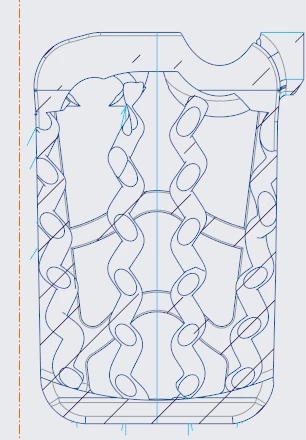
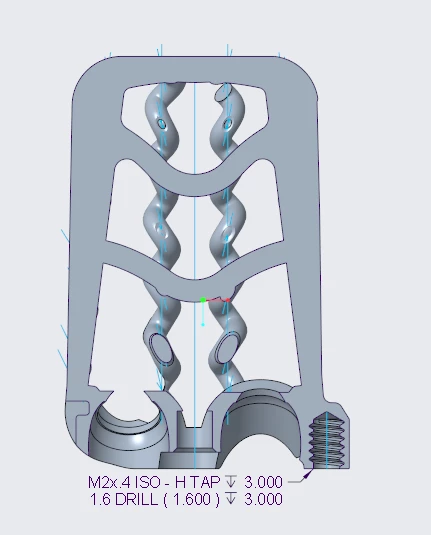
I am using creo 9 and on one of my drawings I have a section view that isn't showing up. The section shows fine in the model, but on the drawing, hatching appears on the view, but it is not cut.  I have tried flipping it and using a local section instead of a full section and switching from a projection to a standalone view. If anyone has any suggestions, I would greatly appreciate it.Screenshot 2025-05-29 142309.pngScreenshot 2025-05-29 142348.png the 
Best answer by StephenW

In the drawing, look at the message log and see if it is saying "x-section aborted".  Occassionally creo has trouble with x-sections in drawings. If I can, I usuaully offset the cutting plane of the x-section by just a little bit, .01, .001, or some relatively small amount and a lot of the time that will let it work.

Just make sure that the little offset doesn't mess up any dimensions created!

3 replies

Dale_Rosema
23-Emerald III
23-Emerald III
May 29, 2025

It looks like the two views are using different planes.

StephenW23-Emerald IIIAnswer
23-Emerald III
May 29, 2025

In the drawing, look at the message log and see if it is saying "x-section aborted".  Occassionally creo has trouble with x-sections in drawings. If I can, I usuaully offset the cutting plane of the x-section by just a little bit, .01, .001, or some relatively small amount and a lot of the time that will let it work.

Just make sure that the little offset doesn't mess up any dimensions created!

Dale_Rosema
23-Emerald III
23-Emerald III
May 29, 2025

I forgot about that trick!

24-Ruby III
May 30, 2025

Hi,

if you can ... upload part+drawing for testing purposes.