1-Visitor
February 19, 2016
Solved

Select All of an Imported Part when Copying a Geometry?

  • February 19, 2016
  • 1 reply
  • 6503 views

Hello,

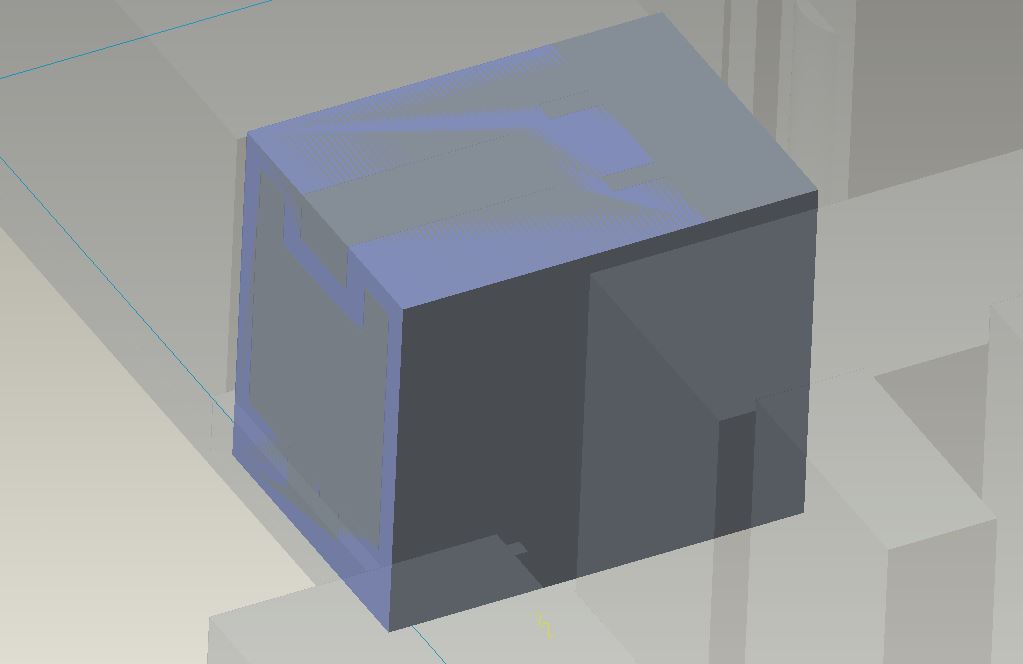
I am trying to copy all of the part geometries of an imported part, into a protrustion.  So, for example, the lighter blue in the photo are just two faces of a much more complex part that I need to copy and paste into the Protrusion (the darker box).

Instead of going through each and every surface, edge, corner, of the part inside of the protrusion, how do I select the entire thing and then Copy and Paste it into the protrusion?

For example, the front face and top face of the light blue, I selected -> Ctrl+C -> Ctrl+V, and then validated with the check mark.  I do not want to do this for each little surface in this part that I imported.  And I am looking for a way to select it all -> Ctrl+C -> Ctrl+V.

Thanks!
select_all.JPG

Best answer by RaphMORIN

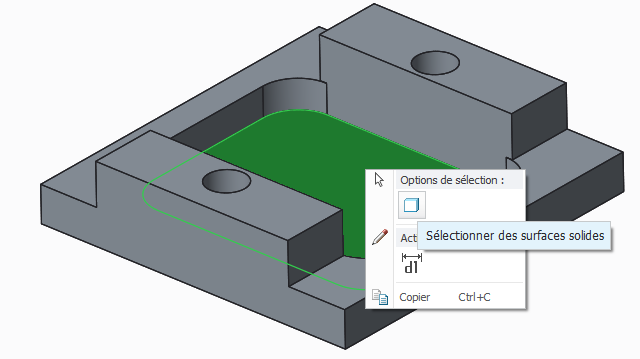
If I understand correctly, your problem is to select all the surfaces of the imported part. To do this, select one surface of the part, then right click and you'll have the option to select all solid surfaces like in the image below, then Ctrl+C Ctrl+V to copy paste.

1 reply

RaphMORIN16-PearlAnswer
16-Pearl
February 19, 2016

If I understand correctly, your problem is to select all the surfaces of the imported part. To do this, select one surface of the part, then right click and you'll have the option to select all solid surfaces like in the image below, then Ctrl+C Ctrl+V to copy paste.

nbrenn1-VisitorAuthor
1-Visitor
February 19, 2016

Thanks for your response.  For some reason, no dialog box shows when I right click.  Is there a way for my to configure my mouse for Right Click ability?

16-Pearl
February 19, 2016

You mean you never have right click enabled in Creo ?