10-Marble
May 25, 2023
Solved

Selecting Quilts

  • May 25, 2023
  • 3 replies
  • 1768 views

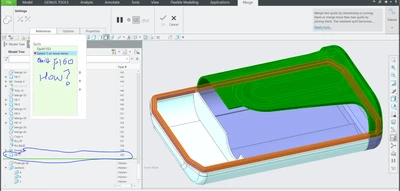
How can I select Quilt F160 from the model tree? I can't select Feature 160 from the graphics window. Any alternate ways to select the desired quilts? Thanks!

TG_10520066_1-1685043851393.png


Best answer by kdirth

When you merge quilts, the order in which they are selected matters.  The new joined quilt retains the identity of the first on picked (the top quilt in the merge list) and the others effectively do not exist.


With all of the merges in your tree, I would guess that the Fill 10 quilt has been consumed in a merge.


I always try to keep the first quilt as I do my merging.  This prevents lost references when making changes later, such as removing an unwanted quilt, as the name is always the same.

3 replies

kdirth
21-Topaz I
May 25, 2023

You need to select both quilts in the tree before selecting merge.

There is always more to learn.
10-Marble
May 25, 2023

Thanks, It worked in this skeleton model but for another skeleton model when I do the same, "Merge" option is greyed out. What could be the reason?


TG_10520066_0-1685045978149.png


kdirth
kdirth21-Topaz IAnswer
21-Topaz I
May 25, 2023

When you merge quilts, the order in which they are selected matters.  The new joined quilt retains the identity of the first on picked (the top quilt in the merge list) and the others effectively do not exist.


With all of the merges in your tree, I would guess that the Fill 10 quilt has been consumed in a merge.


I always try to keep the first quilt as I do my merging.  This prevents lost references when making changes later, such as removing an unwanted quilt, as the name is always the same.

There is always more to learn.
