12-Amethyst
March 26, 2024
Solved

Shaded with Edges Not Activating as Default

  • March 26, 2024
  • 1 reply
  • 2452 views

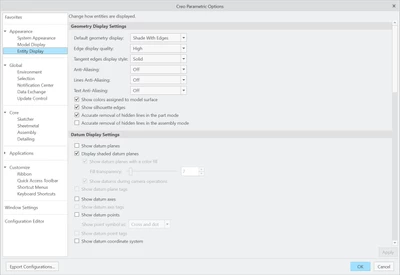
Every time I open the model, the view changes back to "Shaded" even though I have "Shaded with Edges" selected as the default. I'm running Creo 10.

 

JR_10680659_0-1711475604496.png


Best answer by tbraxton

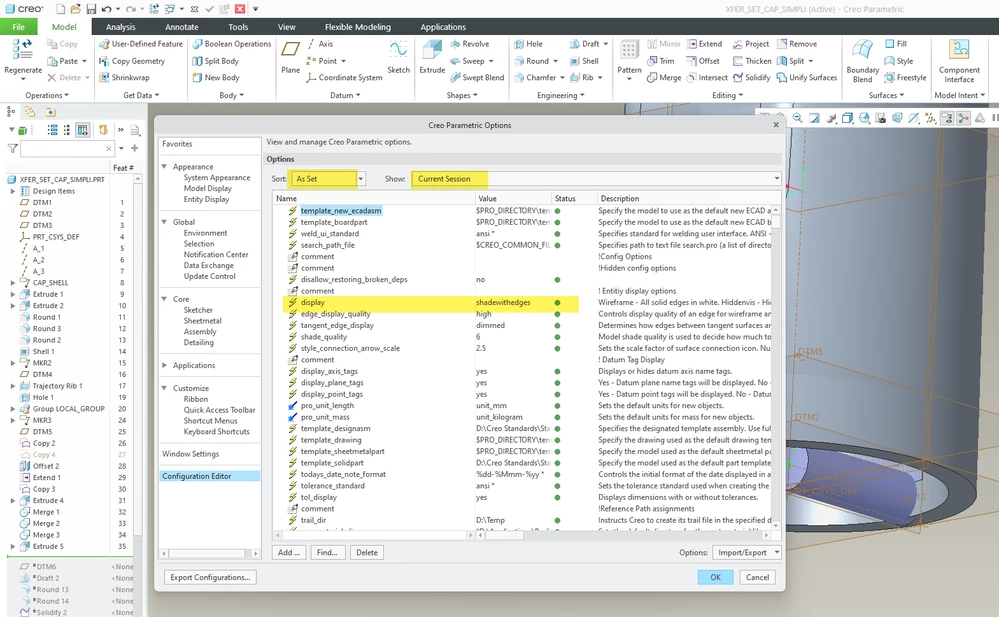
Open the Creo options after you start Creo and check the in session setting of the config option "display". You probably have a config option being read when you start Creo that is causing this, or you have not saved this option to a config that is being loaded when you start Creo. If the option is not set as shown below, then correct this and test the behavior after the change.


Config option:  display shadewithedges


tbraxton_0-1711476237388.png


1 reply

tbraxton
tbraxton22-Sapphire IIAnswer
22-Sapphire II
March 26, 2024

Open the Creo options after you start Creo and check the in session setting of the config option "display". You probably have a config option being read when you start Creo that is causing this, or you have not saved this option to a config that is being loaded when you start Creo. If the option is not set as shown below, then correct this and test the behavior after the change.


Config option:  display shadewithedges


tbraxton_0-1711476237388.png


12-Amethyst
March 26, 2024

That did it! Thank you!