

Yogesh.T
14-Alexandrite
December 16, 2025
Solved

SHAREPOINT multiple folders part access for Assembly

  • December 16, 2025
  • 3 replies
  • 414 views

We are actively moving to SharePoint data storage. Can assembly be organized with Parts in multiple folders / Multiple access users working on different parts of an ASSEMBLY. Assembly Regenerate should update the assembly with latest in SharePoint folders. 
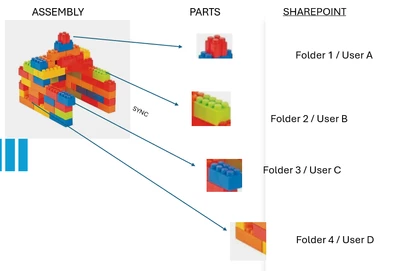
YogeshT_0-1765894113789.png


Best answer by Yogesh.T

create ðŸ—’ search.pro (use note)

"C:\Users\Yxxxxxx\ASxxxxxxx\01_CAD_CREO\04-FaultIxxxxxxxx[FIB]\REF" 

(path of parts in "quotes" )

save it in .asm working directory


go to config.pro

search_path_file

value: c:\user\name\....\workingfolder\search.pro


THIS CORRECT LINK

WE GOOD NOW!


3 replies

23-Emerald III
December 16, 2025

If you set your search paths properly, it should work.

You will need to be careful of the same file name existing in multiple folders as the system will load the first one it finds.

Yogesh.T
Yogesh.T14-AlexandriteAuthor
14-Alexandrite
December 17, 2025

Hi,

I am not using it for a complex ASM. Very simple one step drop ASM. 

How to set search path? 

Folder1 Folder2 Folder3 .... 

No complex parts, No sub assemblies. 

This is exciting if I can set different folders to look for different parts (Provided Part number remains strictly RIGID)


Thanks in Advance!


Always new everyday with Creo!

Yogesh
23-Emerald III
December 17, 2025
10-Marble
December 17, 2025

You will also need to be careful about who saves the assembly if multiple users have it open at the same time.


"He who saves last wins!"

Community Manager
December 28, 2025

Hi @Yogesh.T,


I wanted to see if you got the help you needed.

If so, please mark the appropriate reply as the Accepted Solution. It will help other members who may have the same question.
Of course, if you have more to share on your issue, please pursue the conversation. 


Thanks,
Anurag