
1-Visitor
August 15, 2013
Solved

Sheet Metal for curved part

  • August 15, 2013
  • 1 reply
  • 7008 views

Hi all,

I'm trying to get sheetmetal drawing from part created with swept blend feature.

The trouble I'm having is to use edge rip tool to split the curve. The part I would like to make is attached here.

I have tried a simpler pyramid shape (square top square bot) and was successful in making the sheetmetal.

Thanks in advance for your help.


This thread is inactive and closed by the PTC Community Management Team. If you would like to provide a reply and re-open this thread, please notify the moderator and reference the thread. You may also use "Start a topic" button to ask a new question. Please be sure to include what version of the PTC product you are using so another community member knowledgeable about your version may be able to assist.
Best answer by TomD.inPDX

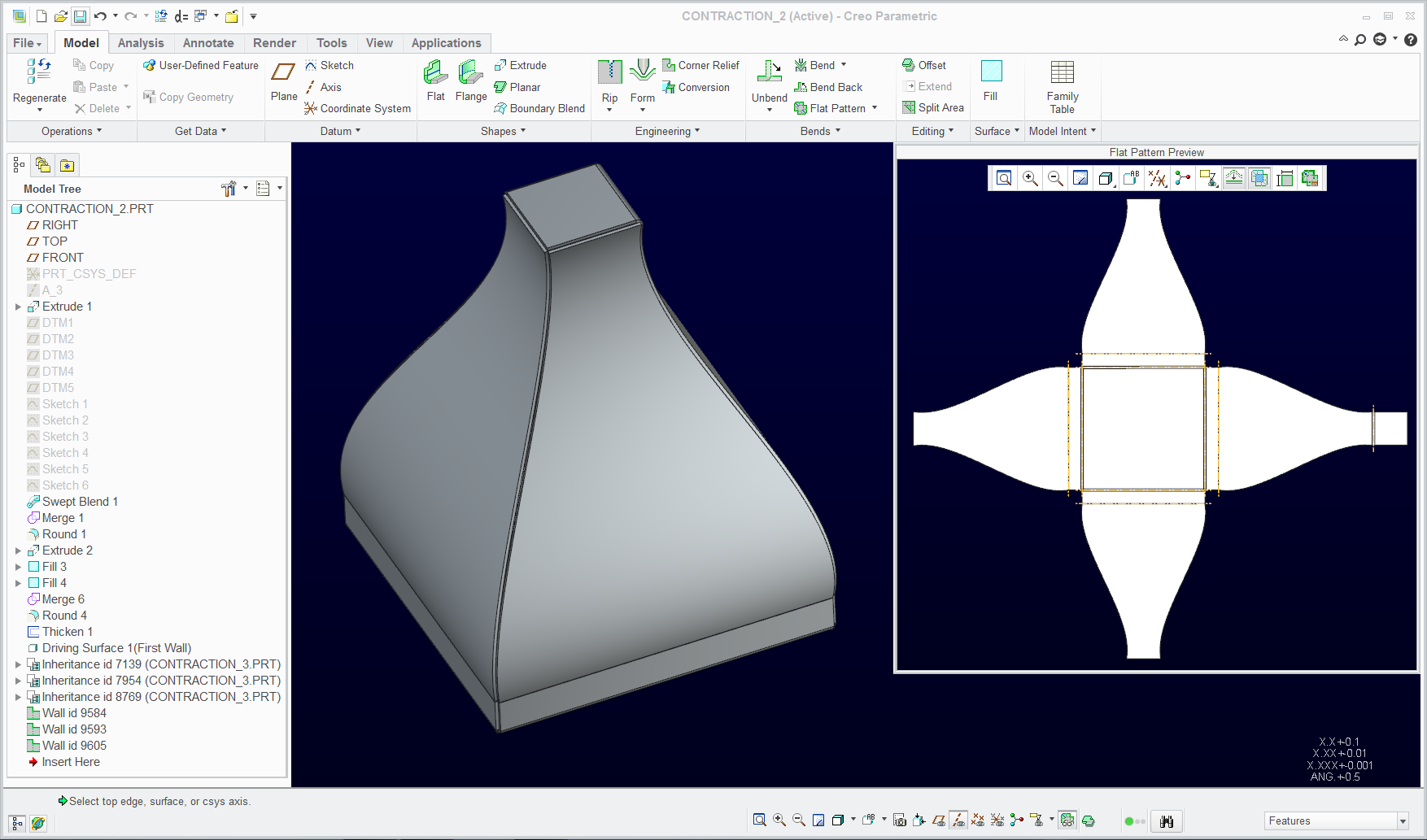
This was definitely a lot more work than I thought it would be, but it is possible.

Creo 2.0 attached

unbend_3.PNG

I used the merge from an assembly level to get the other 3 walls. I you open the assembly 1st, then open the contraction_2.prt.

However I don't know how you are going to form this in the way I modeled it. I could see this more like a clamshell design. Weld two edges along the bottom and 2 edges along the top.

1 reply

17-Peridot
August 15, 2013

The only thing I could do was to do a surface rip on 3 of the faces (6 surfaces). After that, I was able to do an Unbend feature. I removed the small radius ont he top and removed the top surface in the shell command.

unbend.PNG

1-Visitor
August 15, 2013

I was trying to printout the design and make it. But I guess i can merge multiple of the same design in photoshop. Unless anyone else found a way. Thanks Antonious, admirable problem solving skill you have.

17-Peridot
August 16, 2013

Funny shapes in sheetmetal are not easy to deal with. If I wanted a flat pattern of something close to this, I would probably make this with surfaces and use Flatten Quilt to get an fairly accurate flat pattern for each wall.

You have to decide on how you want the edges to merge at the corners but this certainly possible within Creo.

Just because it -is- sheetmetal, doesn't mean you need the sheetmetal module to come up with the right geometry. I have done ribs that have a curved profile in two direction in core Creo where sheetmetal simply cannot do that. If you want a close representation to allow for bend allowances, when you thicken the quilt, offset it to both directions.