Show Model Annotations for Weld Symbols on Top Level Assembly Only
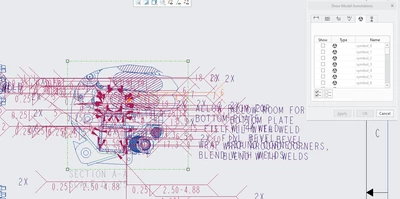
I am using Creo Parametric 9.0 and I have an assembly with weld features and subcomponents that also have weld features. I am creating a drawing and I want to use the show model annotations function to place the weld symbols from the model on a drawing view. When I click on the view and then Show Model Annotations, the Dimension tab shows only the annotations relevant to the top level assembly. However, in the model symbols tab, all of the weld symbols show as optional to insert, including the ones in sub-components, not just the top level (see picture below). With only about 5 symbols needed on the top level assembly, sorting through all the weld symbols is a messy task. Is there any way to only list the top-level assembly symbols and not all symbols for selection? Is there a way to filter so only the top-level assembly symbols are listed in Show Model Annotations?