1-Visitor
August 5, 2022
Solved

SHOW SKELETON ACROSS ALL VIEWS

  • August 5, 2022
  • 1 reply
  • 2919 views

I am creating a drawing using a skeleton of a vehicle that I am mounting components to. Is there set show skeleton display to all views at once or do I have to do it each time I create a view?

Best answer by StephenW

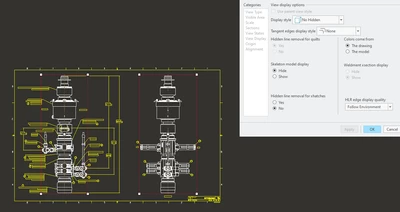
You select all the view on one sheet and RMB Properties and you can show change all of them that are selected.


StephenW_0-1659706709759.png


If I was doing this regularly, I would make a mapkey. Preselect the views then run the mapkey


I don't believe that there is a config setting for skeleton model display to set it in the view properties as shown by default or an option to change all views on all sheets in one click.

1 reply

tbraxton
22-Sapphire II
22-Sapphire II
August 5, 2022

Investigate the view properties to understand what is enabling the display of your skeleton. Do you know why the skeleton is not visible when you add a new view to the dwg?


You can use layers to help control centrally the display within drawing views.If the skeleton geometry is on a layer then you can show/hide this layer for the entire drawing. Since skeletons typically would not have solid geometry the display settings for surfaces and curves may be relevant to your situation.


Refer to the layer control documentation detailing how layers interact between models and drawings, it can be a confusing but is critical to using Creo to create drawings efficiently.

1-Visitor
August 5, 2022

I have to change the skeleton model display after creating each view by clicking show. Wondering if there was a to change the default to show so I dont have to click this for each view.


BM_8212128_0-1659704326163.png


tbraxton
22-Sapphire II
22-Sapphire II
August 5, 2022

Try this, note step 5:


  1. Open Drawing View Properties
  2. Select View Display
  3. Under Skeleton model display, select Show
  4. Click Apply
  5. Save this status in the assembly through View > Visibility group > save Status