Showing Driven Part Dimensions in Drawing
- 2 replies
- 1947 views
- Translate All
Hi all,
I just have a question about showing dimensions with Creo Parametric 7.0.11.0 . I know some work-arounds, but I am just curious if this is possible...
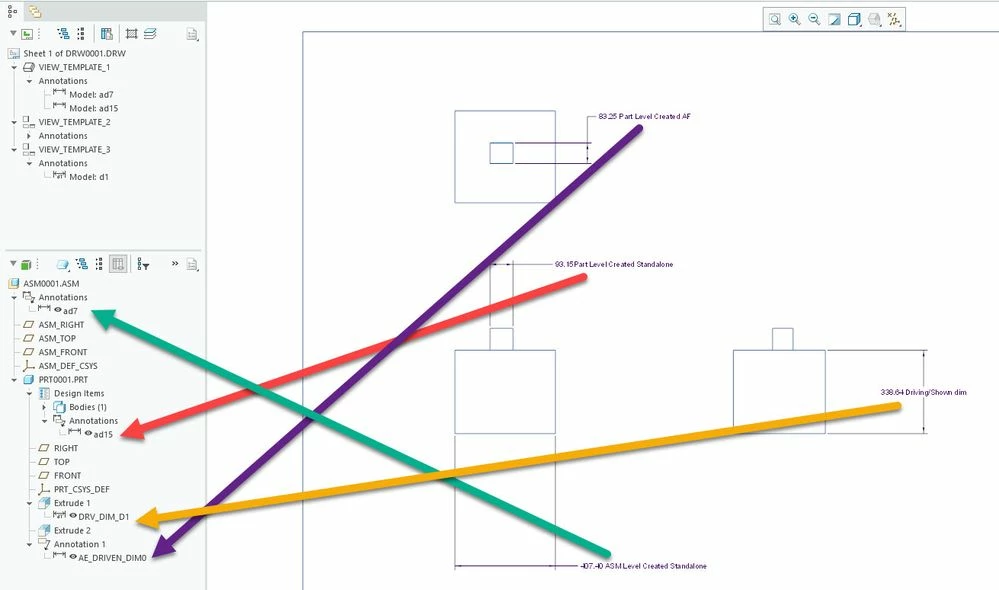
When I make a driven dimension in a part file, I can show that dimension at the higher level in the assembly model. I can't, however, show that dimension in the drawing?
It does work with other annotations like datums or notes, but not driven dimensions.
I can get it to work if I put all of the driven dimensions in the part into an Annotation feature and then show that, but that seems like a weird workaround? Is this the intended functionality and I'm just trying to do things a weird way?
Attached is some screenshots of a test assembly.
Also the reason I am doing it this way is that I have an inseparable assembly with helicoils, pins, etc... and my company is still stuck with Creo 7.
Thanks in advance for any help!