1-Visitor
April 15, 2016
Question

Sketch and views visualization order

  • April 15, 2016
  • 2 replies
  • 2523 views

Hi,

Anyone knows how to change the visualization order of a sketch overlapped on the geometry?
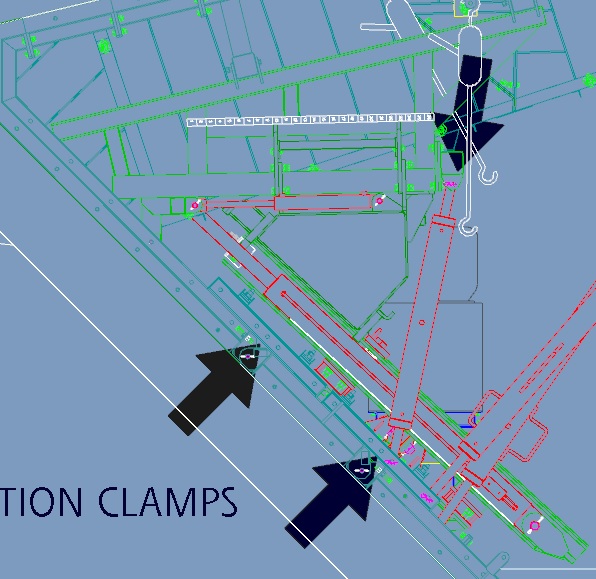
Sin título.jpg

By default the geometry is shown over the scketched arrows, but i want the opposite.

Anyone knows how to do that?

I'm working with creo / pro 5.0

Regards.


This thread is inactive and closed by the PTC Community Management Team. If you would like to provide a reply and re-open this thread, please notify the moderator and reference the thread. You may also use "Start a topic" button to ask a new question. Please be sure to include what version of the PTC product you are using so another community member knowledgeable about your version may be able to assist.

2 replies

24-Ruby III
April 15, 2016

Hi,

create arrows as solid features and place them above model geometry.

MH

fmas1-VisitorAuthor
1-Visitor
April 15, 2016

Hi Martin, thanks for answering,

When you say solid features, do you mean create parts with the arrow shape on the 3d model?

Regards.

24-Ruby III
April 15, 2016

Hi Fernando,


you have understood my reply right.


MH

23-Emerald III
April 15, 2016

This is a standards issue. Solid geometry always takes precedence over leaders, dimension lines, witness lines, etc.

If you print this in monochrome, it will not matter.

I personally would take a screen shot of the geometry and add arrows in a secondary program.

fmas1-VisitorAuthor
1-Visitor
April 15, 2016

Thanks Stephen; the drawings are in color, but I'll take into account the last solution.