
10-Marble
June 28, 2022
Solved

Sketch Setup Icon is greyed out during flange wall creation

  • June 28, 2022
  • 2 replies
  • 3559 views

Hello,  I am a new user of Creo 8.0.


I am trying to create a sketch for a flange wall in sheetmetal mode.


It will not allow me to change the orientation of the sketch, because Sketch Setup is grayed out.
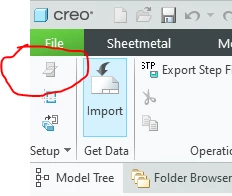
 

JD_9876527_0-1656426507329.png


It doesn't matter if I am defining or redefining the sketch.


Anyone know the secret to accessing this?

Best answer by MartinHanak

Hi,

you can reorient the model using standard orientation tool - you can select saved view -OR- orient the model by selecting geometric references.

2 replies

kdirth
21-Topaz I
June 28, 2022

Creo will always make the sketch plane normal to the selected edge and use the wall to control the X direction.

There is always more to learn.
10-Marble
June 28, 2022

Thanks,


In past versions of Creo (Pro/E)  (Creo 1 e.g.), I could access this menu and rotate my sketch, by selecting a different plane for the secondary reference.


I wish I could just rotate my sketching plane in 90 degree increments til I have the orientation that I want (consistent with the design intent or orientation of the part.)


21-Topaz I
June 28, 2022

Hi after firing Wildfire 4.0 i was unable to access the Edit > References menu: 

remy_0-1656429709295.png

Is there something you did differently?


24-Ruby III
June 30, 2022

Hi,

you can reorient the model using standard orientation tool - you can select saved view -OR- orient the model by selecting geometric references.

10-Marble
June 30, 2022

Of course, but I would have to do that every time I edit that sketch.


That's probably what I'll end up doing.


Thank you