
8-Gravel
July 15, 2023
Solved

Sketcher / Feature ribbon disapearing

  • July 15, 2023
  • 1 reply
  • 2041 views

Good morning all!


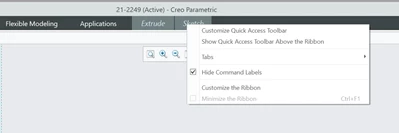
Doing some work in CREO Parametric 8.0.8.0. and after some time I realised that during sketching in a feature the ribbon is gone. I have to click "sketch" again to get all the options.


ctrl-F1 is not working nor is double-clicking.


Right button shows "hide ribbon" greyed-out.

How can this be resolved??


(I found out that CREO is installed under "program files" in Pro/Engineer 20 this was a big mistake triggering all sorts of problems,  is this still the case??)


Best regards!
 

Dennis_V_NL_0-1689402105691.png


Best answer by IbrahimTayyab

Hello,
It seems to me this is caused by pressing this arrow.

arrow.png

With the arrow pointing upwards:

IbrahimTayyab_1-1689403331582.png

With it pointing downwards:

IbrahimTayyab_2-1689403360233.png


This is the fix I found using creo parametric 9.0.

1 reply

14-Alexandrite
July 15, 2023

Hello,
It seems to me this is caused by pressing this arrow.

arrow.png

With the arrow pointing upwards:

IbrahimTayyab_1-1689403331582.png

With it pointing downwards:

IbrahimTayyab_2-1689403360233.png


This is the fix I found using creo parametric 9.0.

8-Gravel
July 15, 2023

Haha simple as that...😂 thanks for your help.

I need to get my laptop display fixed... would have increased the chances of having this found out myself.


Have a nice weekend!!

Dennis_V_NL_0-1689403683349.jpeg


14-Alexandrite
July 15, 2023

Haha I can imagine how that would certainly help. Thank you for your well wishes. 


Have a great day,
Ibrahim


