12 replies

Patriot_1776
22-Sapphire II
January 9, 2020

There is a way in the round command to do "transitions" (see the button I picked with the blue "patch"), where you can simply "intersect" the converging radii or do a spherical corner blend with 4 different dimensions to tweak the resultant "patch" surface.  You might not get exactly what you want, but you should be able to get close.

CORNER_SPHERE.jpg

T_F16-PearlAuthor
16-Pearl
January 9, 2020

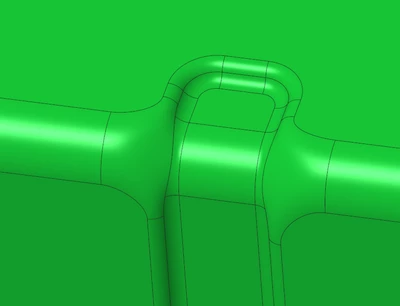
With that simple geometrie it works, But with all of the surfaces that I have, the result is really awfull...

Patriot_1776
22-Sapphire II
January 9, 2020

Bummer.  That's about it unless you want to hand-create a patch, and then create another patch offset on the other side of the thickness of the sheet metal.

15-Moonstone
January 13, 2020

Annotation 2020-01-13 104752.png

Is this similar to what you want to achieve? I did this with a 45-degree extrude prior to rounding. I'm sure you could get a smoother result by using a revolve or something else to cut the geometry, or even to delete the surfaces and patch it using the n-sided patch (I can never get that one to work, though) or boundary blend or something else.

T_F16-PearlAuthor
16-Pearl
January 13, 2020

Not fantastic, the final result is not the same! But anyway, it's a workaround, that takes user a lot of time, other softwares, is only a option in round command. PTC should take a look at this!

15-Moonstone
January 13, 2020

Yes, it's probably easier in other software packages. That's often the case. If you want to speed it up a bit in Creo, if this is a thing you do a lot, you could design a Punch tool or make a UDF, with some variable dimensions, to make it easier for your users.