
1-Visitor
September 14, 2022
Solved

Snap Line, Dimension alignement

  • September 14, 2022
  • 1 reply
  • 1235 views

Hi there


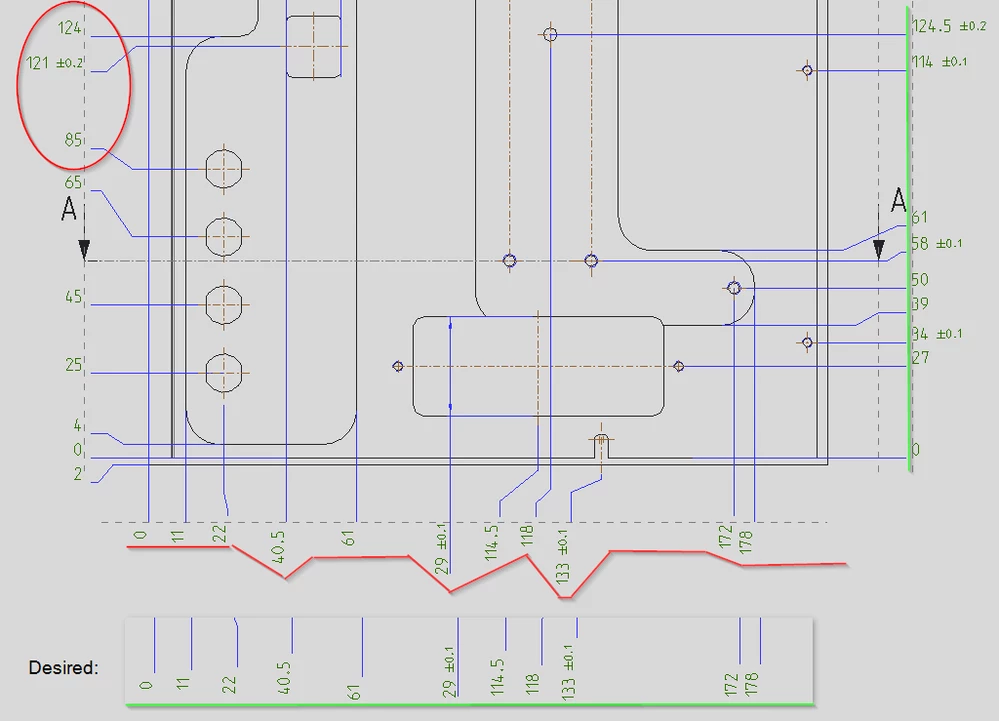
In Creo 8 I noticed that the dimensions* snap at different points to the snap lines.

For top and right side the dimensions are left-aligned, for bottom and left the dimensions are right-aligned

In my opinion this has quite a negative effect on the readability of the drawing.

Is there a way to change that behavior?
 

Nephran_0-1663149066847.png

*this is also true for all regular, non-ordinate dimensions.


Regards

 

Best answer by KenFarley

As far as I know, this is how snap lines have always worked. They align the side of the dimension that is towards the geometry in the view. My biggest complaint is that jogs can't be locked to a snap line.

1 reply

KenFarley
KenFarley21-Topaz IIAnswer
21-Topaz II
September 14, 2022

As far as I know, this is how snap lines have always worked. They align the side of the dimension that is towards the geometry in the view. My biggest complaint is that jogs can't be locked to a snap line.