

1-Visitor
August 23, 2016
Solved

Solid bend

  • August 23, 2016
  • 5 replies
  • 5273 views

I would like to bend a solid from state 1 to 2 using solid bend/flatten quilt combination (or other solid bending Creo 2.0 functionality). In the past I have used flatten quilt to bend solids. However flatten quilt will completely flatten out the surface 1. I would appreciate any suggestions.
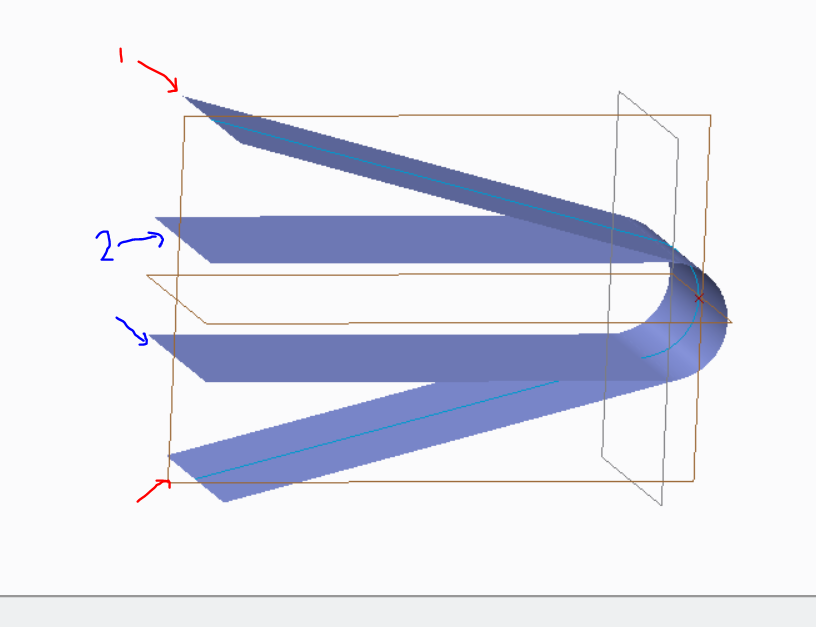
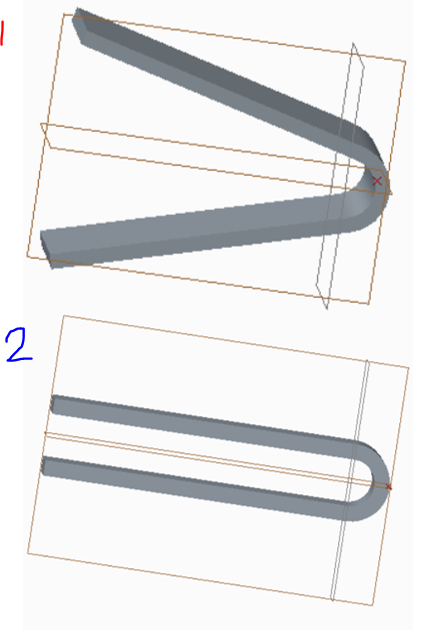
Flatten_quilt.PNGsolid_bend.PNG

Best answer by tgriffin

That was my first thought as well, but I believe that spinal bend would only work if you start with flat state and want a bent state, not if you start with a bent state and want another bent state.  So since you'd still have to start with a flat state, but want two bent states you'd have to redefine the spinal bend anyway for the second bent state (or create two, and have one suppressed  at a time).

5 replies

1-Visitor
August 23, 2016

You could dimension it so you can just change the angular dimension to get to the second state.  Then you could make a part family table with an instance where you vary that dimension or you can make a relation and parameter to define which state it is in.

StephenW
23-Emerald III
August 23, 2016

Is that a spinal bend? Pro engineer (pro e) Advanced spinal bend Tutorial - YouTube

Old video though.

tgriffin1-VisitorAnswer
1-Visitor
August 23, 2016

That was my first thought as well, but I believe that spinal bend would only work if you start with flat state and want a bent state, not if you start with a bent state and want another bent state.  So since you'd still have to start with a flat state, but want two bent states you'd have to redefine the spinal bend anyway for the second bent state (or create two, and have one suppressed  at a time).

kphuyal-31-VisitorAuthor
1-Visitor
August 24, 2016

Thanks I went with this.

kphuyal-31-VisitorAuthor
1-Visitor
August 24, 2016

I tried warp but wasn't able to get the shape because two symmetric prongs wouldn't warp in opposite direction.