10-Marble
May 17, 2023
Solved

Solidify a part

  • May 17, 2023
  • 2 replies
  • 2288 views

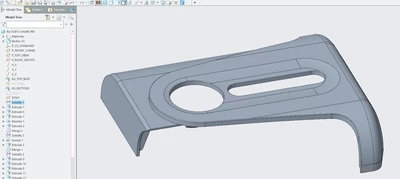
How do I edit sketch or access the main sketch in this part file? It seems like its solidified. 
 

TG_10520066_0-1684344135403.png


Best answer by tbraxton

The red dots indicate models that are missing (not in session). These are parents to the RU-Z_shape.asm. There may be other models needed to access the sketches you are looking for.

2 replies

tbraxton
22-Sapphire II
May 17, 2023

This part includes copy geometry features from another model. You will need to get the parent objects (parts?) of the copy geometry features. If a sketch is available, then it will be in the parent models.


The features shown in the model tree with the name KG prefix are the copy geom features in your model.

StephenW
23-Emerald III
May 17, 2023

If you right mouse button over KG_topbase or KG_button and what kind of feature is it? I can't tell by the icon. 

10-Marble
May 17, 2023

TG_10520066_0-1684345643962.png

TG_10520066_1-1684345681378.png

When I right click and edit the definition, nothing displays on the graphics window.

tbraxton
22-Sapphire II
May 17, 2023

Use the global reference viewer to find the path to the parent models for those copy geometry features. The full path should show the name of the parent models.


If you do not know how to use global reference viewer, start here:

About Reference Investigation (ptc.com)


Example of GRV windows finding full path of a copy geometry feature:

tbraxton_0-1684346505401.png

