
15-Moonstone
April 23, 2026
Question

Spline Manipulation Similar To Solidworks
  • April 23, 2026
  • 5 replies
  • 43 views

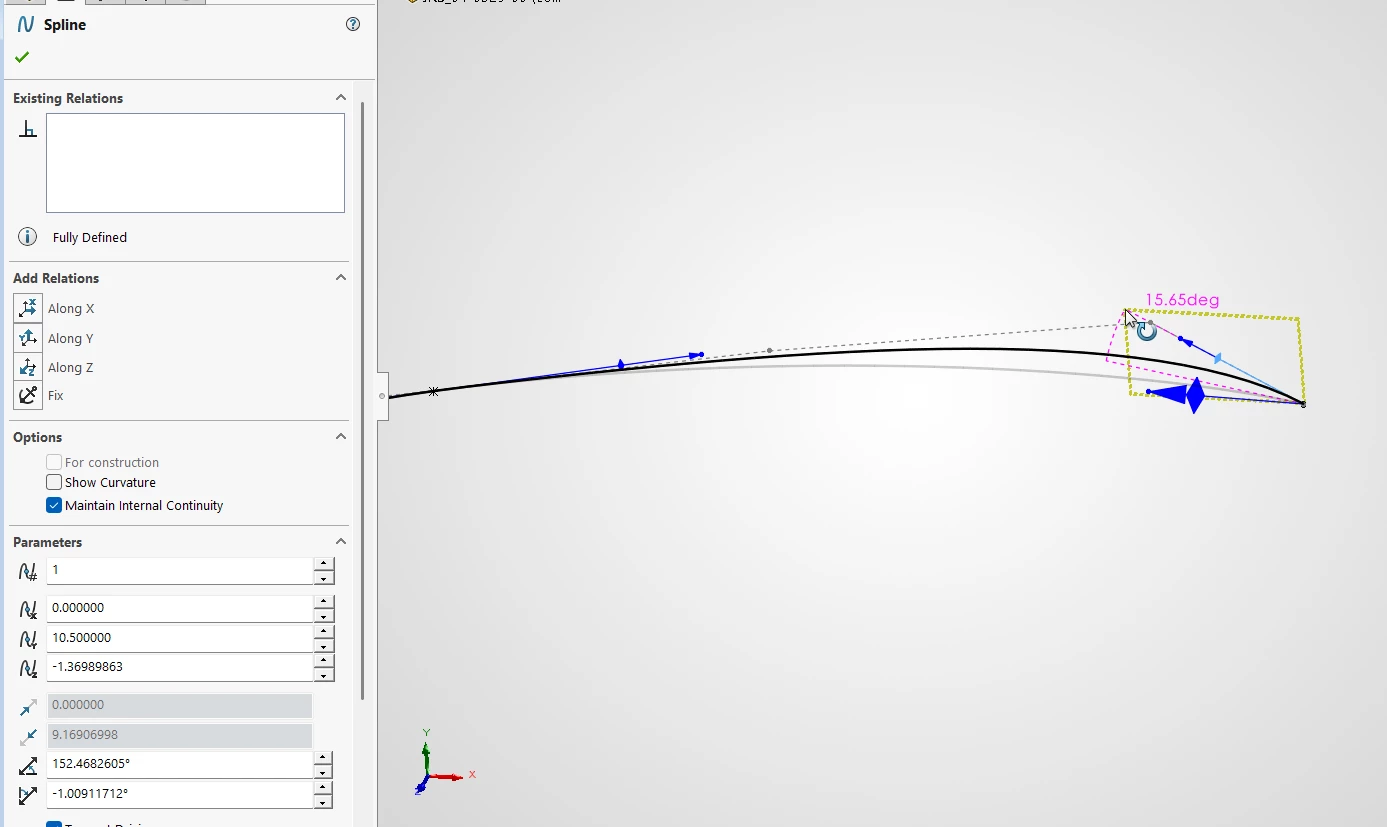
Is there a way in Creo Parametric to adjust splines with drag handles, like in Solidworks?

I am trying to replicate a part from Solidworks, but I cant get the splines to behave just like in the Solidworks part. I’ve noticed that in the Solidworks feature the splines have ben drawn by draging the lines to the desired position.


5 replies

kdirth
21-Topaz I
21-Topaz I
April 23, 2026

Double click on the spline and you will enter the spline tool.  The first button will get you what I believe you are looking for.


There is always more to learn.
AlexK15-MoonstoneAuthor
15-Moonstone
April 23, 2026

Hi Kdirth

Thanks for your reply. I can’t see any options to adjust the spline, exept for the four predefined start and end conditions.


KenFarley
21-Topaz II
April 23, 2026

I think the trouble is you are talking about a 3D spline, created through points, whereas the image showing control points that can be manipulated is for a spline within a 2D sketch.I don’t know if the functionality for moving around control points is possible in Creo. Maybe in a design module like advanced surfacing or cabling or something I don’t have?

Yogesh.T
14-Alexandrite
April 23, 2026

Create Curve1 from PNT1 to PNT2 / Redefine / Play with options / Tweak curve / See Image attached: Hope this is close to what you need. Create Curve2 from PNT2 to PNT3 / Redefine   / now play with Tangency and tweak. / *[ Tweak option will not activate for curves with multiple points]


Yogesh
kdirth
21-Topaz I
21-Topaz I
April 23, 2026

For a 3D curve through points, option Tweak curve is only available with 2 points.  The Style license will allow some more control on a style curve.

There is always more to learn.
KenFarley
21-Topaz II
April 23, 2026

I hesitate to suggest it, but don’t see any other option. If you still have access to SolidWorks and the curve in question, you could generate a set of points on the thing and import them into Creo for use to make the spline. Getting the point distribution along the curve to be just right might be a bit tricky, though. Exporting the curve out of SolidWorks and into Creo might be anothert option, if only as a means of getting data from it.