
1-Visitor
October 2, 2019
Solved

SPRING TABLE - AUTOMATIC

  • October 2, 2019
  • 1 reply
  • 3505 views

Hello,

I am looking for the way how to automate the Spring Table.

What formulas or links I could use to get my table to be automated?


EDITED: How to use the file attributes and show them in the table.


Thank you,

Arek
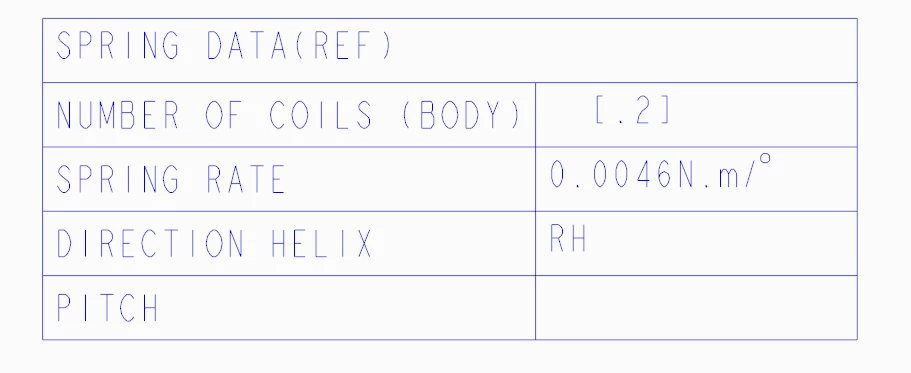
SPRING-TABLE.png

Best answer by Mahesh_Sharma

@ArekTRI 

I think one of the example can be a curve created by equation (helix) and equation will be as

turn = 10
x = 4 * cos (t * (turn * 360))
y = 4 * sin (t * (turn * 360))
z = 10 * t

This will create a helix and turn, x, y and z will be feature level parameters. When creating the drawing of part, use &turn:FID_##, ## is feature ID of curve in part this will display value of turn. 

1 reply

Mahesh_Sharma
22-Sapphire I
October 3, 2019

@ArekTRI 

If these are feature level parameters you can call in in note or table using Feature Id's. 

ArekTRI1-VisitorAuthor
1-Visitor
October 3, 2019

Hi @Mahesh_Sharma 


Thank you for your reply.


Would you explain how to do it in detail step by step?


Thanks,

Arek

Mahesh_Sharma
22-Sapphire I
October 3, 2019

@ArekTRI 

I think one of the example can be a curve created by equation (helix) and equation will be as

turn = 10
x = 4 * cos (t * (turn * 360))
y = 4 * sin (t * (turn * 360))
z = 10 * t

This will create a helix and turn, x, y and z will be feature level parameters. When creating the drawing of part, use &turn:FID_##, ## is feature ID of curve in part this will display value of turn.

