
1-Visitor
February 28, 2011
Question

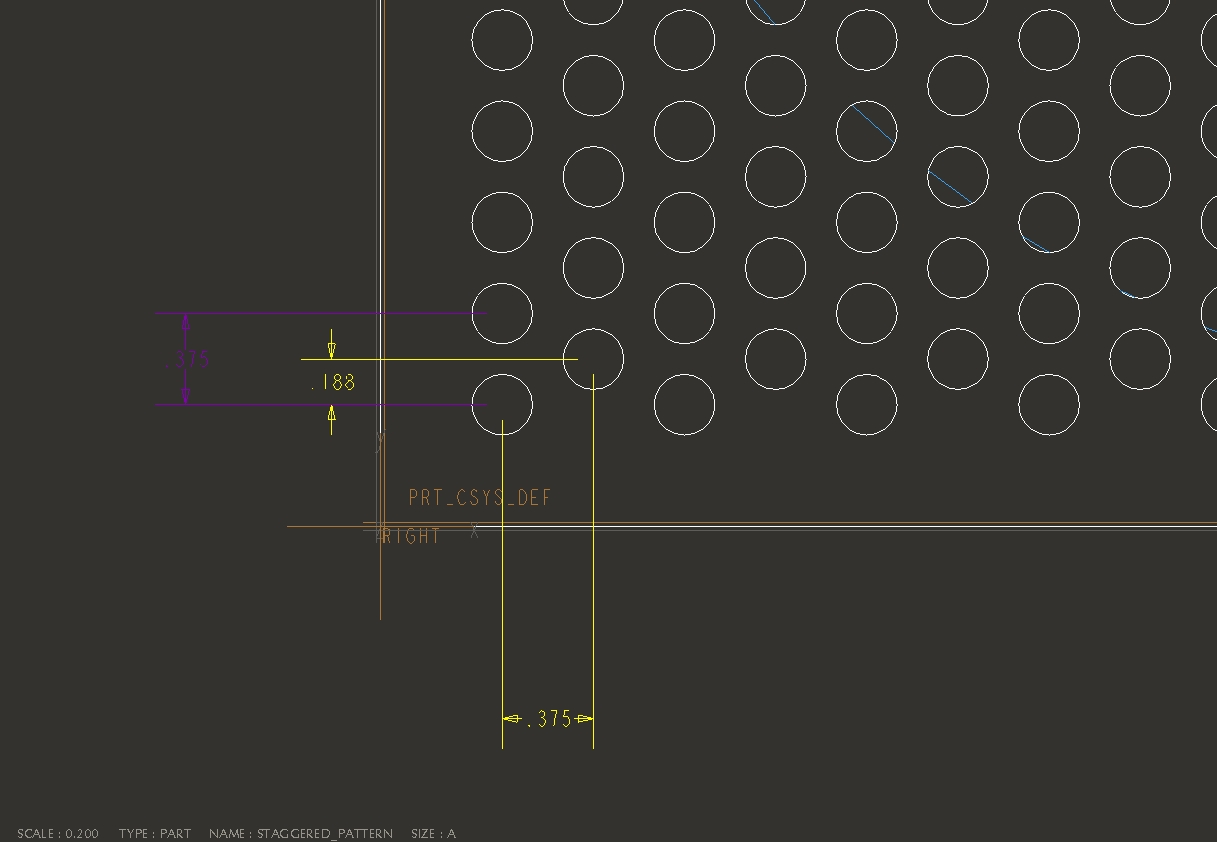
Staggered Hole Pattern
  • February 28, 2011
  • 2 replies
  • 8596 views

Staggered_Pattern.JPG

Hello,

I need help on how to create the above staggered hole pattern within a known dia.

I thought I might be able to do it with Pattern / Fill but couldn't figure a way to get he correct spacing.

Any help would be appreciated.

Thanks,

Brian


This thread is inactive and closed by the PTC Community Management Team. If you would like to provide a reply and re-open this thread, please notify the moderator and reference the thread. You may also use "Start a topic" button to ask a new question. Please be sure to include what version of the PTC product you are using so another community member knowledgeable about your version may be able to assist.

2 replies

1-Visitor
February 28, 2011

One way would be to create two hole patterns. Based on the dimensions you have given I don't think you're going to be able to use the fill pattern type.

1-Visitor
March 1, 2011

It is possible to do it with a pattern command. Please have a look at the picture below and the command menu for the right pattern selection.

untitled.bmp

1-Visitor
March 1, 2011

Sciyer26,

I tried that technique, but I end up with the same horizontal and vertical spacing.

1-Visitor
March 2, 2011

Try enlarging the image (Click on it) attached in my earlier reply. I do not have proe open on my screen. Observe the TYPE of FILL Pattern used. The Dimensions, 10 and 5 are derived dimensions. The input dimension is [(10/2) * sqrt (2)] which happens to be the diagonal dimension as shown. I shall try to include a model later.