Best answer by tbraxton

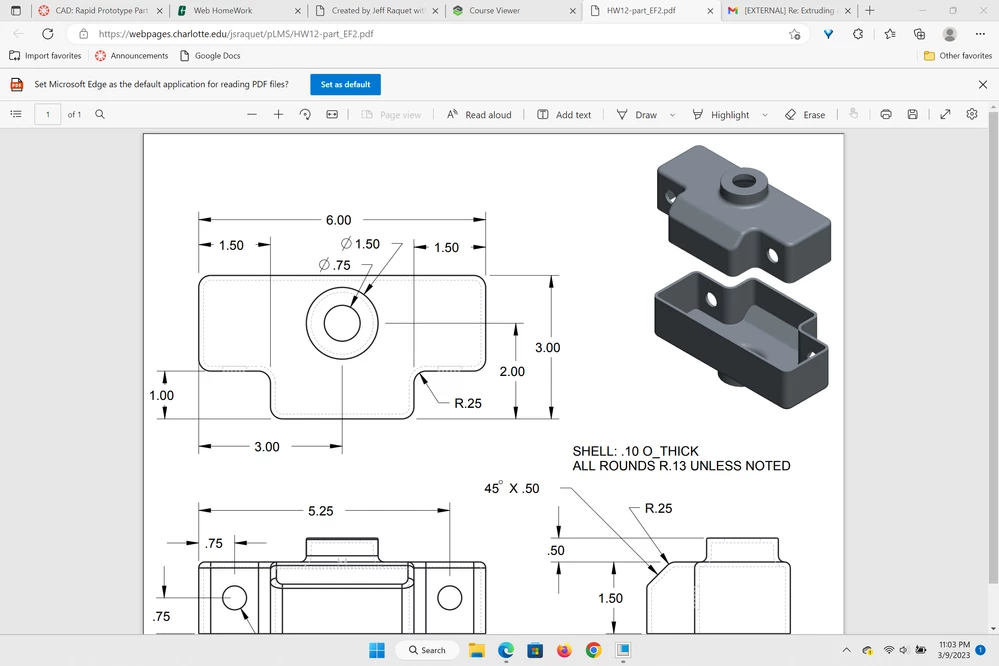
I assume you want to create a model of the part. 


One approach:

Extrude the "T" shape with sharp corners (in top view)

Add the boss on the top

Add the chamfer

Add the rounds to the external rounds to "T" shape

Shell the model using the bottom face for removal

Add the two holes in the front view

Add the hole in the boss


3 replies

24-Ruby III
March 10, 2023

Hi,

go to youtube.com and find some demo video

tbraxton
tbraxton22-Sapphire IIAnswer
22-Sapphire II
March 10, 2023

I assume you want to create a model of the part. 


One approach:

Extrude the "T" shape with sharp corners (in top view)

Add the boss on the top

Add the chamfer

Add the rounds to the external rounds to "T" shape

Shell the model using the bottom face for removal

Add the two holes in the front view

Add the hole in the boss
 

23-Emerald III
March 10, 2023

When your model is done, File-New-Drawing

Choose a drawing template or a blank sheet

Put the top view on the sheet

Project the other views on the sheet

Show dimensions in each view, if the model was defined with those dimensions

If the shown dimensions are not right, add dimensions in the annotation tab

