15-Moonstone
December 2, 2021
Solved

Surface finish symbol attached to the surface in Creo Drawing

  • December 2, 2021
  • 15 replies
  • 7851 views

Hello!


How do I add the surface finish symbol onto the surface that needs to be machined?

Desired symbol is Ra 3.2 (machining required, all around).


Best regards,

Sergey

Best answer by JS_9824412

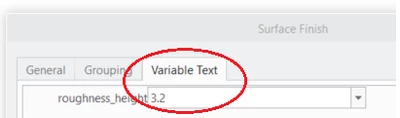
Type in 3.2 as shown in below snapshot. Otherwise create a free Note "Ra 3.2" and relate it to view.

JS_9824412_0-1638459169346.png


15 replies

tbraxton
22-Sapphire II
December 2, 2021

Under the annotate tab select surface finish and in the placement tab select the on entity option.


http://support.ptc.com/help/creo/creo_pma/usascii/index.html#page/detail/symbols_surf_finish.html 


Sergey15-MoonstoneAuthor
15-Moonstone
December 2, 2021

This command is insufficient as it miss what I am asking for.


15-Moonstone
December 2, 2021

Type in 3.2 as shown in below snapshot. Otherwise create a free Note "Ra 3.2" and relate it to view.

JS_9824412_0-1638459169346.png