1-Visitor
March 7, 2022
Solved

Surface view on a solid

  • March 7, 2022
  • 4 replies
  • 1644 views

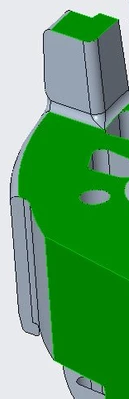
I have a problem to visualization some surfaces.

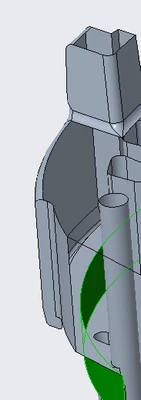
When opening an assy or only the part some faces are not  showed correctly.

The problem is not in all parts and assy that I have. In other files with similar assy them are showed ok.


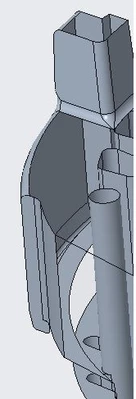
faces like trasnparency.
CG_10214494_1-1646654553649.png


see faces selected with problem

CG_10214494_2-1646654570911.png


CG_10214494_0-1646654526722.png


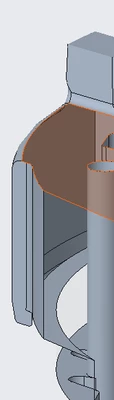
If I make a section view, I see the solid not surfaces.
CG_10214494_3-1646655261496.png


CG_10214494_4-1646655439225.png


Well, I hope any help.

Regards.


Best answer by tbraxton

These types of issues are often a graphics display problem. Are you using a PTC certified hardware configuration? The first thing to try is to turn on shade very small surfaces in the options tab. You can also alter the display quality and create some simplified reps for testing. The fact that it only occurs in some assemblies would suggest that is a graphics display error.


You can also try setting the graphics to use the win32-gdi option for testing.

  • Use hidden configuration option graphics = win32_gdi

This article has some tips for debugging

https://www.ptc.com/en/support/article/CS169272 

4 replies

tbraxton
tbraxton22-Sapphire IIAnswer
22-Sapphire II
March 7, 2022

These types of issues are often a graphics display problem. Are you using a PTC certified hardware configuration? The first thing to try is to turn on shade very small surfaces in the options tab. You can also alter the display quality and create some simplified reps for testing. The fact that it only occurs in some assemblies would suggest that is a graphics display error.


You can also try setting the graphics to use the win32-gdi option for testing.

  • Use hidden configuration option graphics = win32_gdi

This article has some tips for debugging

https://www.ptc.com/en/support/article/CS169272 

G4M84ND31-VisitorAuthor
1-Visitor
March 8, 2022

Hi, thanks for your help.

Are you using a PTC certified hardware configuration?

No, I have Dell but with Intel Graphic.


Anyway

Do to you comments, I have started to review the option.

So... when desactivating the "enable transparency" the faces have been displayed. They have a different colors though the material properties are the same in model.


CG_10214494_0-1646745012038.png


To change color I had to reapply the generic material.

Well, really thanks for comments about it. Maybe it was too simple but, I don't understand why some faces displayed and other don't.


Thank you so much.


23-Emerald IV
March 7, 2022

I've had similar issues in the past with certain features created prior to 2000 and also with some older helical sweeps.  Might be worth opening a case with PTC so they can take a look at it.

G4M84ND31-VisitorAuthor
1-Visitor
March 8, 2022

Ok thanks. Let me see what I can do.