10-Marble
May 2, 2025
Solved

Sweep problem, not cutting as planned

  • May 2, 2025
  • 1 reply
  • 1321 views

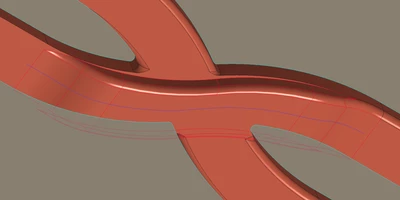
I'm having an issue with Sweep in a channel. I'm not sure why it doesn't cut as much on sides following walls.


You can easily guess what the intent was. I'm not sure what went wrong with my idea of how to cut the shape actually.


Also, it doesn't generate some rounds around as planned.
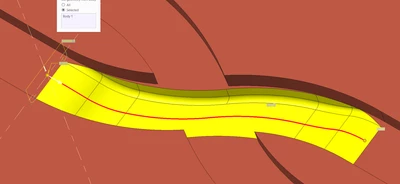
AJ_12152667_0-1746171661831.png


AJ_12152667_1-1746171678914.png


EDIT: it sems like the cut sketch follows YZ plane in normal instead being normal to the intersect. I'm not sure how to force it to follow the intersection's normal.



Best answer by tbraxton

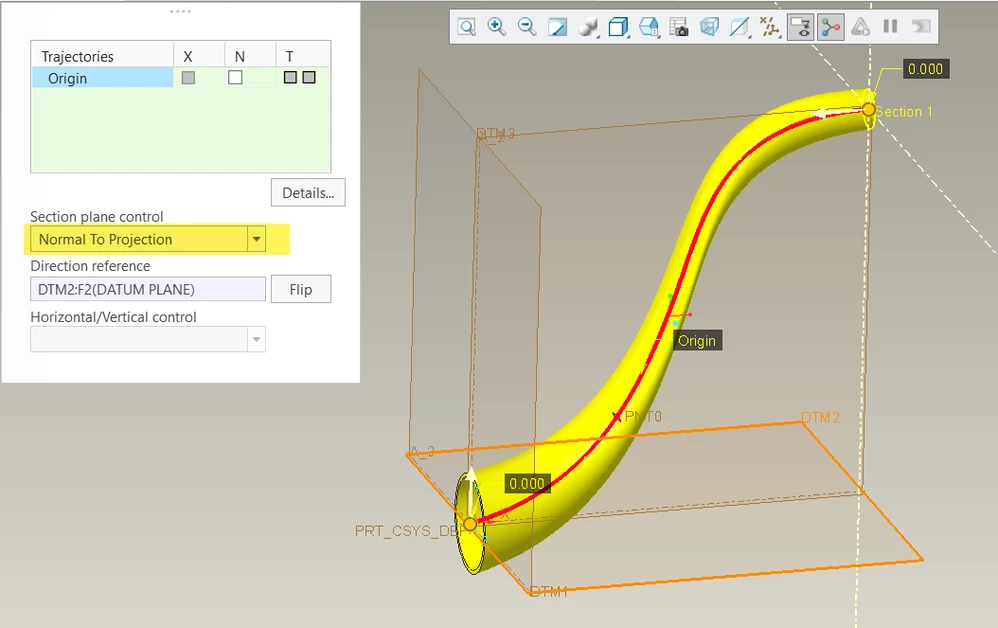
You can control the sweep section orientation such that it matches the Z axis for the milling set up. This should make it possible to avoid any undercuts.


tbraxton_0-1746703980673.png


1 reply

tbraxton
22-Sapphire II
22-Sapphire II
May 2, 2025

Try an alternate approach to creation of the swept cut using two trajectories. It looks like the trajectories exist in the model before you would create the sweep. Use the normal to trajectory option with the second trajectory set as the X-direction reference in the sweep feature.

tbraxton_0-1746186501988.png

tbraxton_1-1746186663831.png


10-Marble
May 2, 2025

That's an one interesting suggestion @tbraxton, thank you.

I'll try to do this way and reply about the result.