
4-Participant
May 29, 2023
Solved

Swept function icon

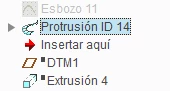
Hello, I was wondering why is the Swept function displayed as below? (Protrusión ID 14) PTC Creo 2.0
RD_10565855_0-1685371532438.png

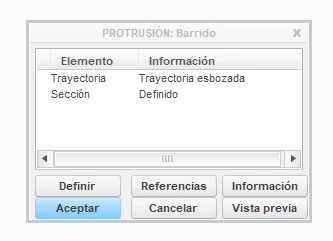
The edit funciont dialog is as below:
RD_10565855_1-1685372050067.png

I have read the icon list and says

RD_10565855_2-1685372126897.png

When I create swept this icon is not displayed. I dont kwnow how create swept operation with this icon. Wich is the difference?


24-Ruby III
May 30, 2023

Hi,

dialog box shown on your picture belongs to feature which was available in Pro/ENGINEER Wildfire. I guess you opened very old part. You cannot create this feature in Creo anymore.

3 replies

tbraxton
22-Sapphire II
May 29, 2023

The model tree implies that FID#14 was a protrusion created using the sweep function.

Translate
24-Ruby III
May 30, 2023

Hi,

dialog box shown on your picture belongs to feature which was available in Pro/ENGINEER Wildfire. I guess you opened very old part. You cannot create this feature in Creo anymore.

Translate
4-Participant
May 30, 2023

Thank you very much!

Translate
